
How Hermes Agent tools work, and which to enable first
Pull-quote: “A tool’s real specification is its worst case: what it can damage when the model is wrong or manipulated.”
Hermes Agent tools are what turn a model from a conversation into a process that changes state on your machine, and the moment you enable one you own its blast radius. Without tools, the worst a model can do is be wrong in text. Give it write access to your filesystem and it can be wrong in your files. So the goal is to enable tools in a deliberate order, knowing what each one reaches, because an agent that cannot act is a chat window with extra steps.
This post assumes you have finished installing Hermes Agent and surviving your first session and have a provider configured, and it assumes no prior experience with function calling, tool schemas, or agent frameworks. By the end you will know what a tool call is, what happens on each hop between the model and your disk, how to classify a tool by the damage it can do, and which small set to switch on first.
What you will be able to do
- Trace a tool call from the model’s request to the result landing back in its context window.
- Name the native tool categories in Hermes and say what each one reaches.
- Classify any tool as read, write, or destructive, and predict its worst case before enabling it.
- Configure a first tool set that is useful within an hour and safe to leave running.
- Verify that an action actually happened instead of trusting the agent’s summary of it.
- Recognise when you have enabled too many tools and made the agent less reliable.
What is a tool, from the model’s point of view?
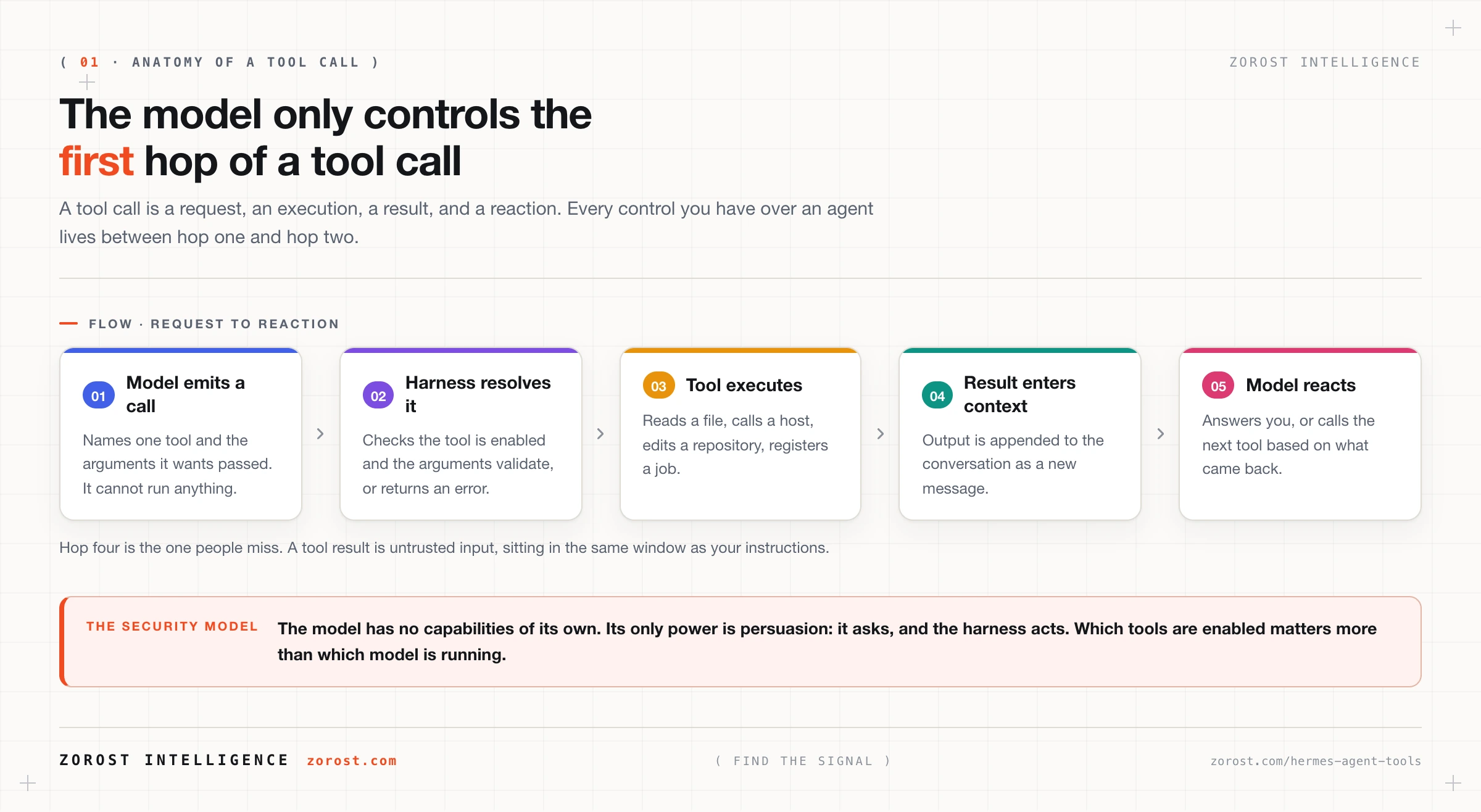
A tool is a named function with a declared argument list that the model can request but cannot run itself. The model never touches your disk, your network, or your Git repository. It emits a structured request naming the tool and the arguments it wants passed, and the harness decides whether to execute it. A harness is the program wrapped around the model that holds the loop, the state, the tools, and the budgets. Here, the harness is Hermes.
That separation is the entire security model. The model has no capabilities of its own, and its only power is persuasion: it asks, and the harness acts. Every control you have over an agent lives in that gap, which is why “which tools are enabled” matters more than “which model am I running”.
From inside the context window, a tool is a short description: a name, a sentence about what it does, and the shape of its arguments. The model chooses between tools by matching your request against those descriptions, reading text and picking the best fit. That detail explains a failure mode later in this post.
What does a tool call look like end to end?
A tool call is four hops: the model emits a structured call, the harness checks and executes it, the result returns into the context window as a new message, and the model reads that result and decides what to do next. Nothing in that cycle guarantees the result is true.
The call is a small structured object. Field names differ between providers, so read the shape rather than the spelling:
{
  "tool": "read_file",
  "arguments": { "path": "/Users/you/projects/site-content/README.md" }
}
Hop one, the model emits that. Hop two, the harness resolves read_file against the enabled tools, and if the tool is missing or an argument fails validation the model gets an error rather than an action. Hop three, the tool runs and its output is appended to the conversation as a result message. Hop four, the model reads that result and either answers you or calls another tool.
Hop three is where most people’s mental model breaks, because a tool result is untrusted input. A file, a web page, or an issue body lands in the same context window as your instructions, and text in that content can try to redirect the agent. A tool that reads the outside world is also a channel for instructions you did not write, which guardrails and prompt injection covers properly.
Which tools does Hermes ship with natively?
Hermes ships native tools in five categories: filesystem access, HTTP requests, Git operations, cron job management, and configuration. Native means the tool comes with the harness and needs no external process, unlike tools supplied by an MCP server. The exact tool names inside each category are not reproduced here [NEEDS SOURCE]; check the tool reference at hermes-agent.nousresearch.com before you write a skill or a scheduled job that names one.
The category is the useful unit anyway, because it tells you the blast radius:
| Category | What it reaches | Risk class |
|---|---|---|
| Filesystem | Files and directories on the machine running Hermes | Read, write, and destructive |
| HTTP requests | Any host the machine can reach, plus whatever it returns | Read, and write against APIs |
| Git | Repository history, branches, and working tree | Write, and destructive |
| Cron job management | Scheduled work that runs when nobody is watching | Write, and it multiplies other tools |
| Configuration | Hermes’s own settings and enabled capabilities | Write, and it can widen every other radius |
Cron job management deserves a closer look. Hermes exposes a single cronjob tool with action-style operations: create, list, pause, edit, and remove. Jobs can be described in natural language, such as “every weekday at 8am, summarise priority issues and post to the team channel”, or with an explicit expression such as 0 8 1-5. Definitions persist under ~/.hermes/ and survive restarts, and the gateway scheduler ticks every 60 seconds to run whatever is due.
Read the last row of that table again. A configuration tool can change which tools are enabled, so anything that can widen the agent’s own permissions belongs off until you have a specific reason.
Why does the difference between read tools and write tools matter?
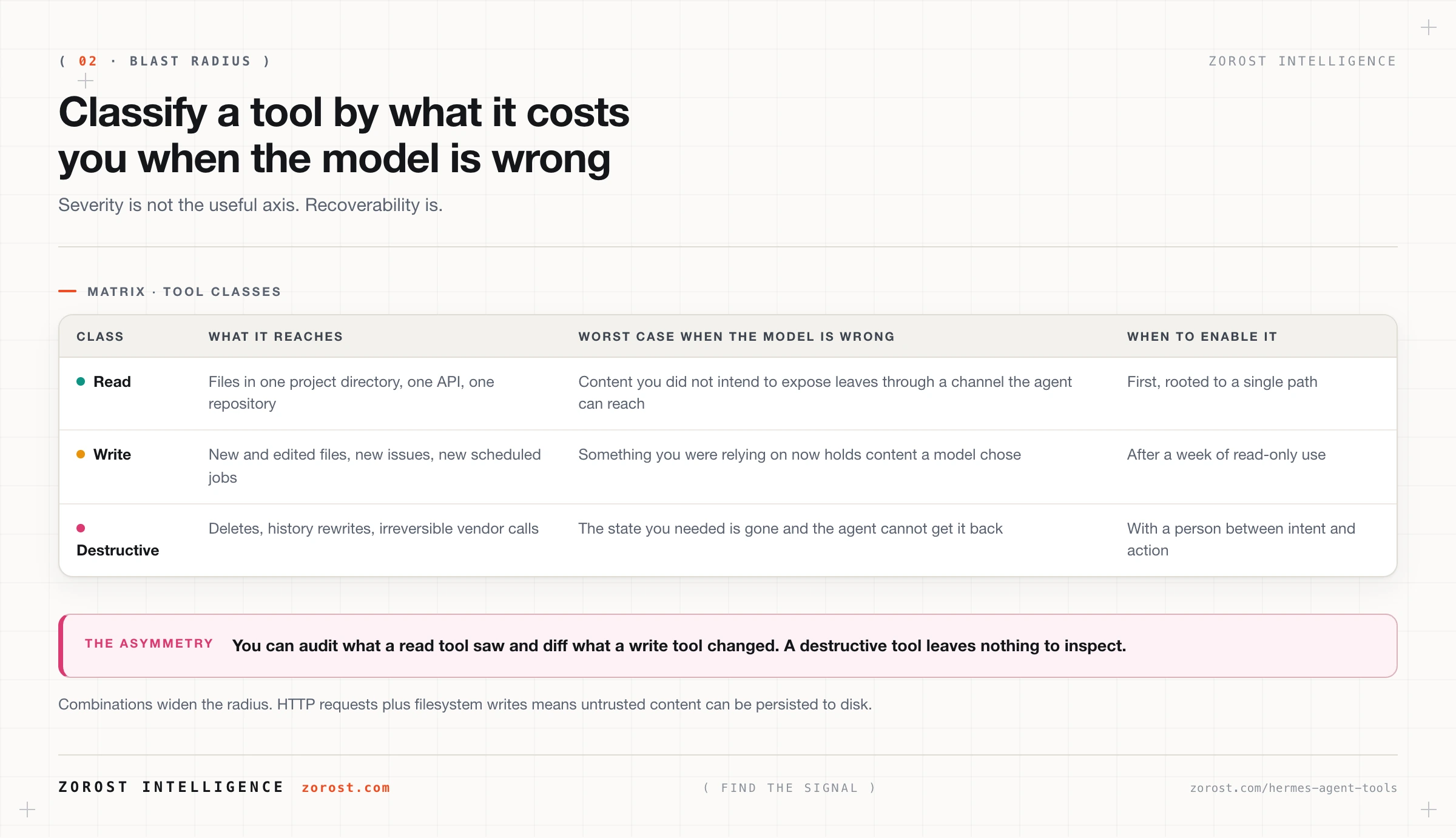
Read tools cost you confidentiality, and write tools cost you integrity. A read tool that behaves badly shows the model something you did not intend to expose, and from there the content can leave through any channel the agent can reach, including a reply in a chat window. A write tool that behaves badly changes something you were relying on being correct.
The third category is the one people discover late: destructive tools, where the failure has no path back. Deleting a file, rewriting Git history, removing a scheduled job other work depended on, or calling a vendor API that cannot be reversed all sit here. The axis separating the three classes is recoverability. You can audit what a read tool saw and diff what a write tool changed, but when a destructive tool fires wrongly the state you needed is gone.
Which is why the order of enablement matters more than the count. An occasionally wrong read-only agent is annoying, an occasionally wrong write-capable agent creates work, and an occasionally wrong destructive-capable agent creates incidents.
How do you work out a tool’s blast radius before you enable it?
Ask one question per tool and answer it in specific resources rather than adjectives: what is the worst thing this can do if the model is wrong, or if someone has manipulated it into acting? Four sub-questions get you there.
- What does it reach? Name the actual paths, hosts, and repositories. “The filesystem” is not an answer. “Everything under
/Users/you/projects/site-content” is. - Can it write, and if so what can it overwrite? A tool that only creates new files has a smaller radius than one that can replace existing ones.
- Is any effect irreversible? If yes, the tool needs a human between the intent and the action.
- Who else can trigger it? Once the messaging gateway is running, anyone on its allowlist can invoke any enabled tool.
Answer those four per tool and the safe first set assembles itself. The exercise also surfaces combinations, which is where the surprises live. HTTP requests plus filesystem writes means untrusted content can be persisted to disk. Cron job management plus any write tool means that write can happen at three in the morning with nobody reading the result.
Why should the agent verify at the source instead of trusting its transcript?
Because the transcript records what the agent intended, and only the source system records what happened. A write can fail on permissions, hit a path that does not exist, or partially apply, and the model still holds a message in its context saying it made the change. Ask it later and it will tell you the change is in place, sincerely and wrongly.
The fix is a discipline rather than a feature: after any write, make a separate read call against the system you wrote to, hitting the real state rather than the transcript.
Made concrete with the tool whose mechanics are documented. You ask the agent to create a weekday summary job and it reports success. Verification is the cronjob list action, which reads back what is actually registered, plus the definitions persisted under ~/.hermes/. Then wait for the first scheduled run and read ~/.hermes/logs/gateway.log, where the scheduler records the jobs it fired. You know the pattern is working when the list action returns the job you asked for and the gateway log shows it running on the tick you expected. If the two disagree, trust the list action.
Which tools should you enable first, and in what order?
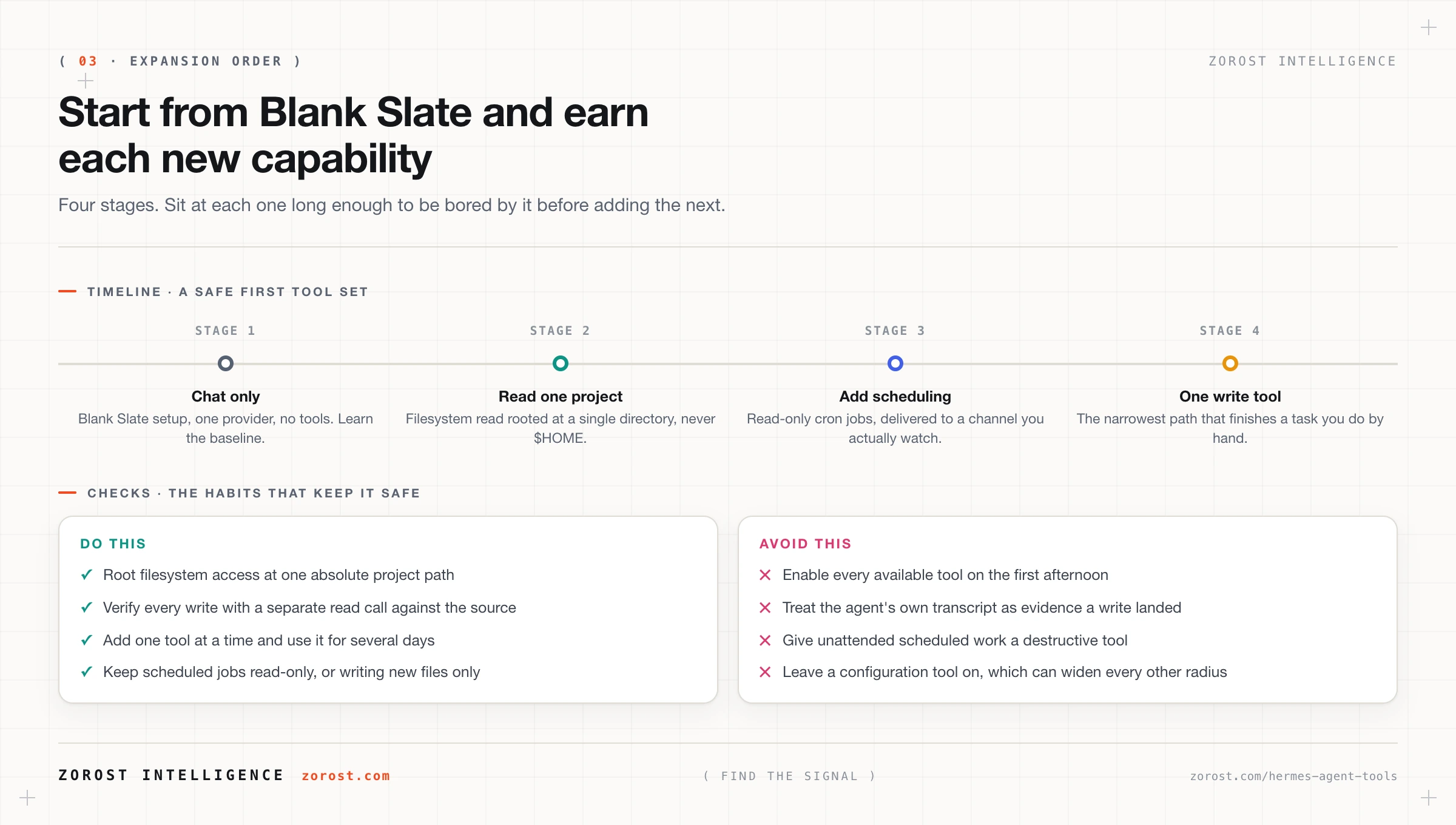
Start with nothing, then add read access to one directory, then scheduling, then a single write path. Hermes makes the first step easy: hermes setup offers a Blank Slate mode where everything is off and you opt in deliberately. Choose it. Adding capability to an empty tool set is a decision each time, where removing capability from a full one is a chore you will not finish.
A four-stage order that works:
- Chat only. One provider, no tools. Learn how the agent behaves when it can only talk, so you have a baseline for judging it later.
- Read one project. Filesystem read access rooted at a single directory, never your home folder. Most of the value people expect from an agent arrives at this stage.
- Add scheduling. Cron job management with read-only work, delivered into a channel you actually watch. The agent now acts while you are not present, which is a bigger change than it sounds.
- Add one write tool. Pick the narrowest one that finishes a task you keep doing by hand, and verify every write with a read call for the first week.
Sit at each stage long enough to be bored by it. Enabling stages two, three, and four on one afternoon leaves you no way to tell which change caused the behaviour you did not expect.
Does enabling more tools make the agent better?
No, and past a modest set it makes the agent worse at selection. Two mechanisms are at work. Every enabled tool spends context window on its description, competing with your instructions and the results you want the model reasoning over. And every enabled tool adds a candidate to each selection decision, so near-miss tools with similar descriptions get chosen instead of the right one.
The symptoms are recognisable. The agent picks a plausible neighbour of the correct tool. It calls three tools where one would do. It narrates what it is about to do without calling anything. For how to name and shape tools so a model can pick between them reliably, see tool design for agents.
Where this goes wrong
The agent reports success and nothing happened. A confident summary, no corresponding change in the real system. The model is reading its own earlier claim out of the context window. Fix it with a separate read call against the source after every write, and a habit of believing the read over the transcript.
Tool selection degrades after you enable a batch of tools. Near-miss choices, redundant calls, or narration in place of action, caused by context spent on descriptions plus too many similar candidates. Disable the batch and re-add one tool at a time.
A fetched page changes the agent’s behaviour. The agent does something you did not ask for shortly after reading external content. That is indirect prompt injection: instructions sitting inside the content it fetched. Keep write tools out of sessions that read untrusted sources, and read guardrails and prompt injection before widening anything.
The filesystem tool reaches further than you thought. The agent cites files from outside the project you were discussing, because the root is $HOME rather than a project directory. Use one directory per purpose, as an absolute path.
A destructive action fires inside a scheduled job. Something is deleted or overwritten while nobody was watching, because unattended work had write or destructive tools available. Keep scheduled jobs read-only, or writing new files only, and read the gateway log after the first few runs.
Common questions
Does Hermes need tools to be useful?
No. A tools-free Hermes session is still a persistent assistant with memory, which is more than a stateless chat window offers. Filesystem read access is where most people feel the change, because the agent can reason over your actual material instead of what you paste in.
Can I stop the agent before it runs a write tool?
The dependable control is which tools exist in the session and how narrowly they are scoped, decided in advance. For a human in the loop on a specific write, keep the write tool off, let the agent prepare the change, and apply it yourself. Less elegant than an approval prompt, considerably more predictable.
How many tools is too many?
You will know from behaviour before you know from a number, and the number differs per model. Watch for near-miss selections and redundant calls. When those appear you are past the limit for that model and that task.
Why does the agent describe a tool call instead of making one?
Usually because the tool it wants is not enabled, so explaining what it would do is the best move available. Sometimes because the tool descriptions in context are ambiguous enough that the model hedges. Check the enabled tool set first.
Next steps
Move on to connecting MCP servers to Hermes Agent safely, which is how the categories in this post extend to your repositories, your browser, and your internal APIs without writing integration code for each one.
For the general theory, tool design for agents covers typed contracts, error surfaces a model can recover from, and side-effect declarations. To tighten the whole system rather than one tool, the Hermes Agent threat model collects allowlists, secret handling, and audit into a hardening checklist.
The same pattern, with approval gates on every write, runs behind ComplyGrid in federal compliance work, where an agent may assemble and propose a change but a person commits it.