
Choosing and configuring models for Hermes Agent
Pull-quote: “Hermes Agent treats the model as a setting rather than an architecture. Below roughly 64,000 tokens of context, though, no setting will save you.”
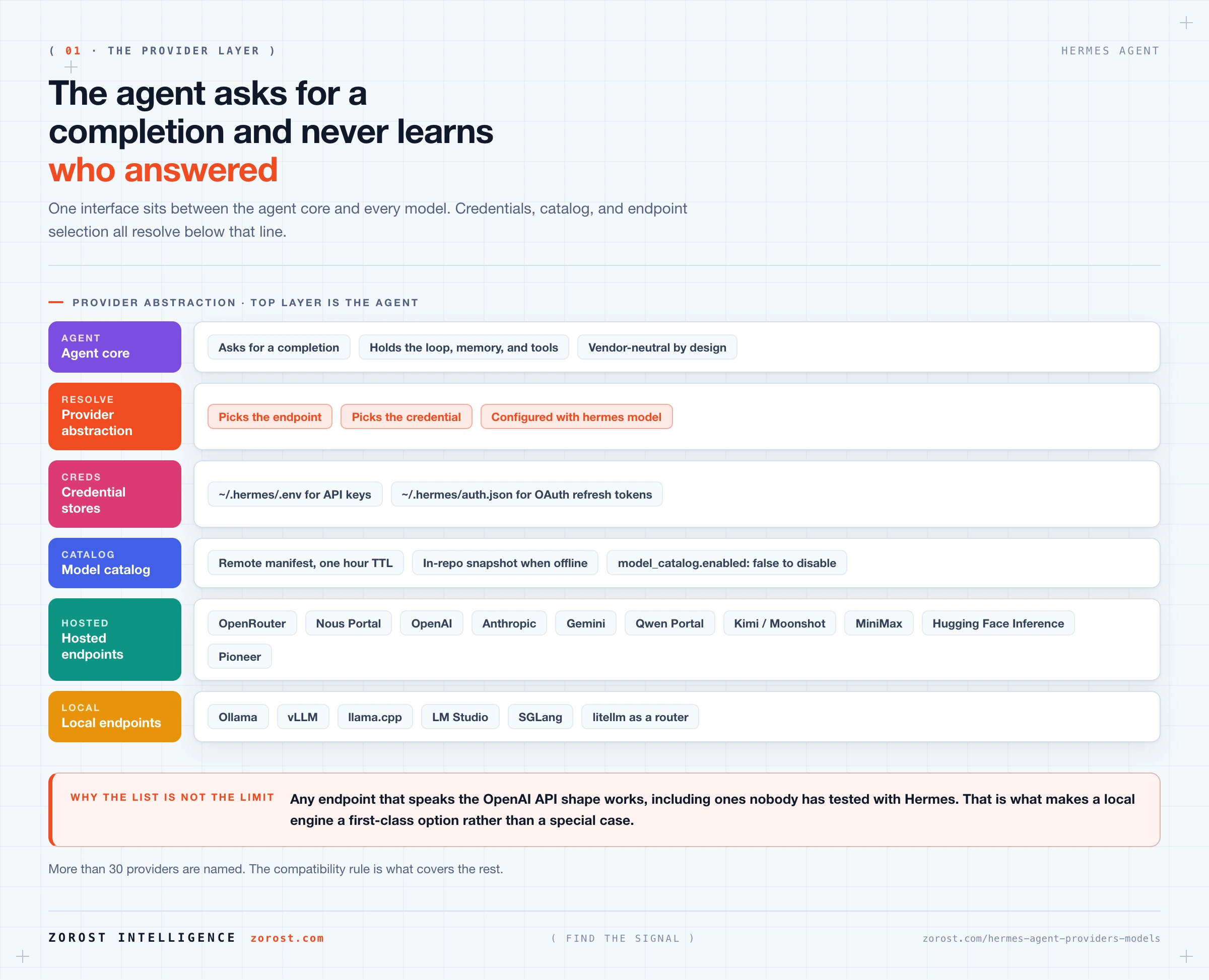
Hermes Agent works with more than 30 model providers plus any OpenAI-compatible endpoint, and switching between them changes nothing else about the system. This post explains the layer that makes that true, how to configure providers of both kinds, and how to decide which model a given piece of work deserves.
You should already have Hermes Agent installed with one provider configured. If not, installing Hermes Agent and surviving your first session covers that in twenty minutes. Everything here builds on a working hermes chat.
Model choice is the decision that most affects both what your agent can do and what it costs you. The good news is that it is reversible at any moment, including mid-conversation.
What you will be able to do
- Explain why Hermes Agent is model-agnostic and what that design buys you in practice.
- Configure both API-key providers and OAuth providers, and say where each stores its credential.
- Name the main providers available and group them into aggregators, direct providers, and local engines.
- Understand the model catalog, its one-hour cache, and what happens when you are offline.
- Switch models inside a running session, or start a session on a specific model.
- Judge a model for a workload on four axes instead of picking by reputation.
Why is Hermes Agent model-agnostic, and what does that buy you?
Hermes Agent is model-agnostic because the harness holds everything that makes an agent useful: the loop, the memory, the tools, and the gateway. The model supplies judgment on each turn, and judgment is the one part that swaps cleanly.
This is also the point where the naming confusion is worth clearing up. Nous Research publishes both Hermes Agent and a family of Hermes language models, but the harness has no dependency on them. It runs any supported model from any supported provider.
What the design buys you is three kinds of freedom. You are not tied to a single vendor’s pricing, availability, or terms, so a price change or an outage is a configuration edit rather than a migration. You can match the model to the work, using something cheap and quick for routine jobs and something stronger where the task actually needs it. And you can move to a model running on your own hardware without rewriting anything, because a local engine looks like any other provider to the harness.
How does the provider abstraction actually work?
The provider abstraction is a single interface between the agent core and whatever model is answering. The agent asks for a completion, and that layer resolves which endpoint to call and which credential to use.
You configure it through a wizard:
hermes modelhermes model is where you add a provider, authenticate it, and choose which model the agent uses by default. It is the tool you reach for after the initial hermes setup, and you can return to it as often as you like.
The abstraction accepts any OpenAI-compatible endpoint, which is a stronger statement than a list of supported vendors. It means a provider nobody has ever tested with Hermes will work if it speaks the same API shape, and it is why running a model on your own machine needs no special support: an engine such as Ollama serves an OpenAI-compatible endpoint at http://localhost:11434/v1, and Hermes treats that exactly like a hosted service.
What is the difference between an API-key provider and an OAuth provider?
An API-key provider is one where you paste a secret into ~/.hermes/.env. An OAuth provider is one where you sign in through a browser, and Hermes stores the resulting refresh token in ~/.hermes/auth.json. Two credential types, two files, one behaviour difference that matters.
API keys are plain environment variables in a file you control:
OPENAI_API_KEY=your-key-here
ANTHROPIC_API_KEY=your-key-here
GEMINI_API_KEY=your-key-here
KIMI_API_KEY=your-key-here
OAuth means you authenticate through a browser and the application receives a token instead of your password. Nous Portal and Qwen Portal both work this way. Nothing gets pasted, and the refresh token lands in auth.json rather than .env.
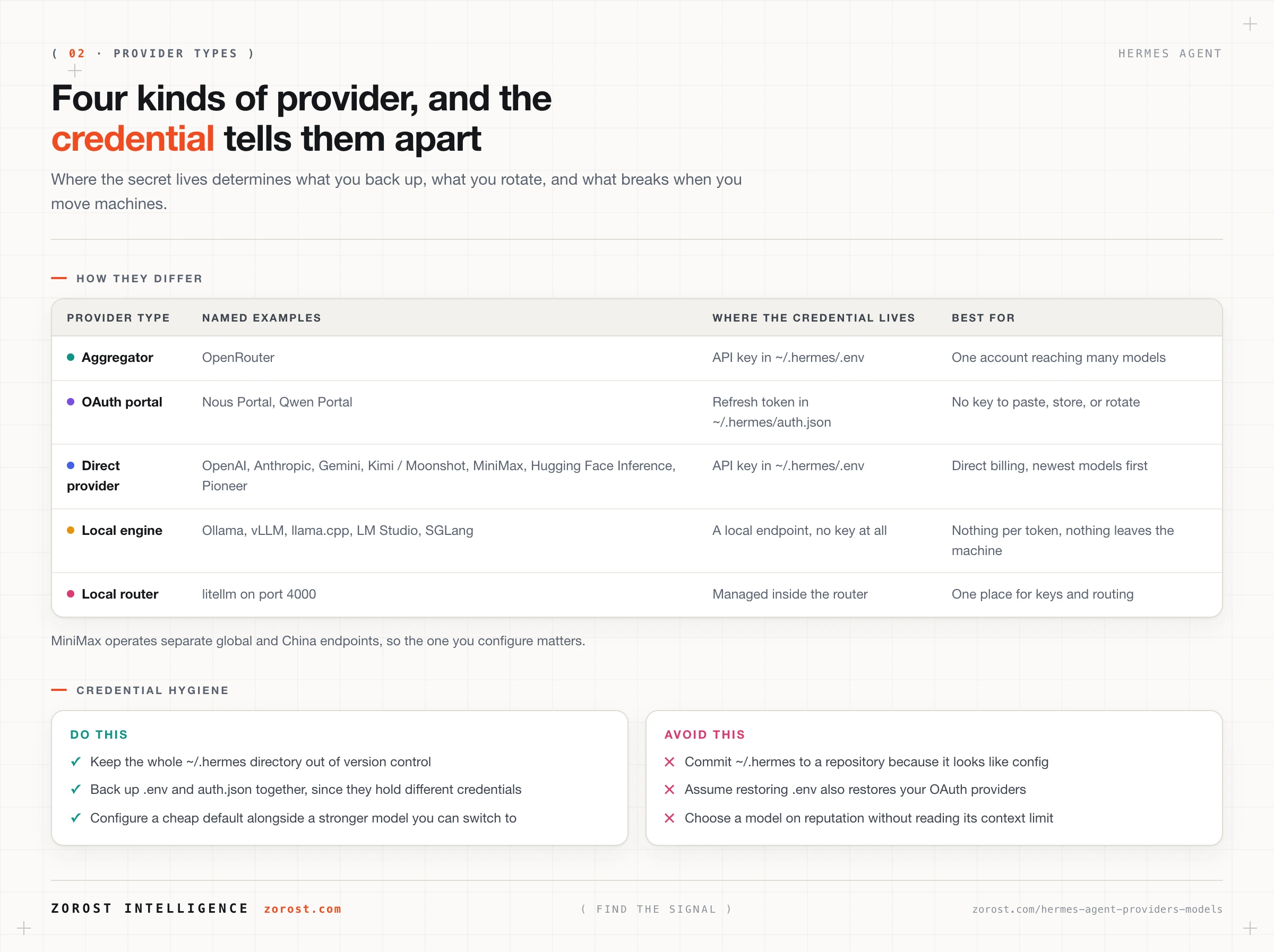
The practical difference shows up when you move machines or restore a backup. API keys travel in .env and keep working. OAuth tokens live in auth.json, so if your backup covered one file and not the other, half your providers will work and half will ask you to sign in again. Both files are credentials and neither belongs in a code repository.
Which providers can Hermes Agent use?
More than 30, plus any OpenAI-compatible endpoint. They fall into four groups that behave differently enough to be worth naming.
| Group | Named options | Credential | Why you would pick it |
|---|---|---|---|
| Aggregator | OpenRouter | API key in ~/.hermes/.env |
One account across many models, easy comparison |
| OAuth portals | Nous Portal, Qwen Portal | Browser sign-in, token in ~/.hermes/auth.json |
No key to paste, store, or rotate |
| Direct providers | OpenAI, Anthropic, Gemini, Kimi / Moonshot, MiniMax, Hugging Face Inference, Pioneer | API key in ~/.hermes/.env |
Direct billing and a vendor’s newest models first |
| Local engines | Ollama, vLLM, llama.cpp, LM Studio, SGLang | A local endpoint, no key | Nothing per token, and nothing leaves the machine |
Two details are easy to miss. MiniMax operates separate global and China endpoints, so the one you configure matters. And litellm can sit in front of everything as a router: you run it with litellm --config litellm_config.yaml --port 4000 and point Hermes at http://localhost:4000/v1, which puts provider selection and key management in one place instead of in the agent’s configuration.
Local engines are a substantial topic of their own, covered in running Hermes Agent fully local with vLLM, Ollama, and llama.cpp.
What is the model catalog, and why does it refresh every hour?
The model catalog is a remote JSON manifest listing the models available through OpenRouter and Nous Portal, cached with a one-hour default TTL. TTL means time to live, the period a cached copy is treated as current before it is fetched again.
The reason for a remote manifest is that provider catalogues change constantly. New models appear, old ones are retired, and none of that should require you to upgrade Hermes. A one-hour cache is the compromise: fresh enough that a model released this morning shows up today, cheap enough that the agent is not fetching a manifest on every startup.
When the manifest cannot be fetched, Hermes falls back to an in-repo snapshot that ships with the source. That is why the model picker still works on a plane or behind a restrictive firewall. The snapshot will be older than the live list, which is worth remembering if you go looking for a model you know exists and cannot find it.
You can turn the whole mechanism off by setting model_catalog.enabled: false in ~/.hermes/config.yaml. That is the right choice in an air-gapped or tightly controlled environment, where an outbound call to a manifest URL is unwelcome, or anywhere you want the available model list to be fixed and reviewable rather than changing underneath you.
How do you switch models without restarting the agent?
Use /model inside a running session. It changes the model mid-conversation, so you can start a task on something cheap and escalate when it turns out to be harder than expected.
/modelTo begin a session on a specific model instead, pass it on the command line:
hermes chat --model openrouter/google/gemini-3-flash-previewIn that documented example the identifier starts with the provider, openrouter, followed by the model as that provider lists it. Starting a session this way is useful for scripted or repeated work where you want the model pinned rather than inherited from your default.
Switching mid-session is more useful than it first appears. A long research task can run on an inexpensive model while it gathers material, then switch to a stronger one for the synthesis, and the conversation carries across the change.
How do you choose a model for a given workload?
Judge it on four axes, in this order, because the first one is a gate and the other three are trade-offs.
- Does it clear the context floor? A persistent agent needs roughly 64,000 tokens of context or more. This is pass or fail. Read the
Context limit:line printed when a session starts. - Does it call tools reliably? An agent that describes a tool call rather than making one stalls the loop. Test with a small task that needs two tool calls in sequence, not with a conversation.
- What does a run cost? Agents send far more context per request than a person chatting does, so per-token price multiplies across every turn. Frequency matters as much as unit price.
- How long are you willing to wait? Latency dominates an interactive session and barely matters for a job that runs at eight in the morning and delivers to a chat channel.
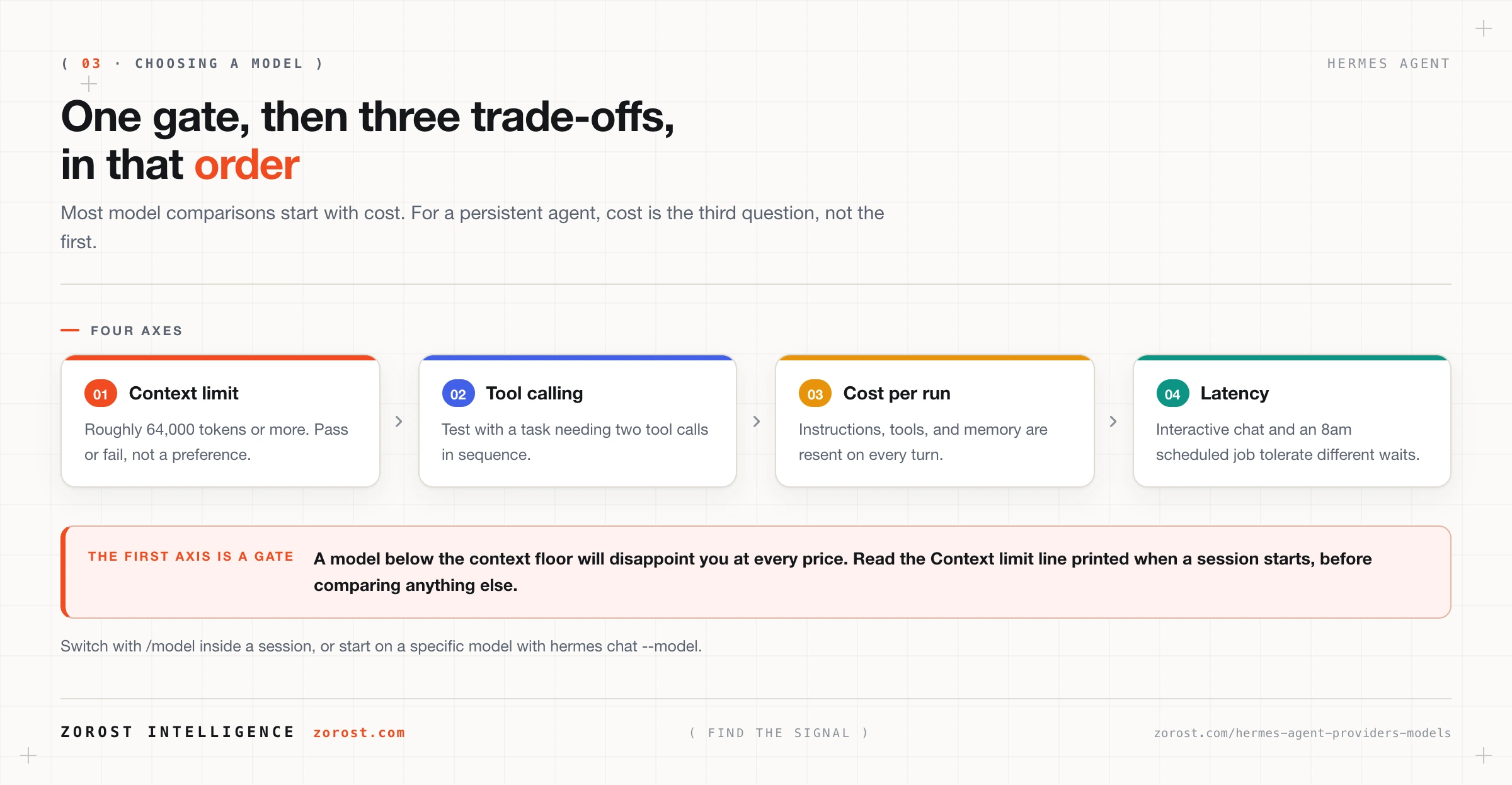
Those four rarely point at one model, which is the argument for configuring several and switching between them. Cost specifics, and the full ladder from free to frontier, get their own post next.
Why does the 64,000 token floor rule out otherwise attractive small models?
Because a persistent agent has already committed a large share of its window before your message arrives. System instructions, the definition of every enabled tool, the memory retrieved as relevant, and the conversation so far all occupy the same context window on every single turn.
A model advertising a small window is therefore working with far less usable room than the number suggests. It will run. It will answer the first few turns well. Then it starts dropping instructions given earlier, or redoing a step it already completed, and the behaviour looks like unreliability rather than a capacity limit.
This is why an excellent small model can be the wrong choice even when it is fast and free. The fix is a larger window, not better prompting. Within a session, /compress reduces accumulated conversation history and buys back room, but it cannot manufacture capacity that the model never had.
Where this goes wrong
Hermes will not start because no provider is configured. At least one LLM provider must be configured or the agent cannot run. Run hermes model to add one, or hermes setup to walk the full configuration again.
You picked the cheapest model and the agent became forgetful. The symptom is an agent that loses the thread on multi-step work. The cause is a context limit below roughly 64,000 tokens. Check the startup line and switch models; no amount of prompt tuning compensates for a window that is too small.
The model list looks out of date. The catalog fell back to the in-repo snapshot because the remote manifest could not be fetched. Restore connectivity and wait for the cache to refresh, remembering the one-hour default TTL, or accept the snapshot deliberately by setting model_catalog.enabled: false.
You restored a backup and half your providers stopped working. API keys live in ~/.hermes/.env and OAuth refresh tokens live in ~/.hermes/auth.json. Backing up one file and not the other leaves you signed out of exactly the OAuth providers.
You have swapped models three times and the same task keeps failing. The failure is probably not judgment. Look at whether the tool the task needs is configured, whether the relevant memory is being retrieved, and whether the window is exhausted. The harness, not the model, decides whether your agent works covers how to tell these apart.
Common questions
Can I use more than one provider at the same time?
You can configure several providers and move between them. /model switches the model inside a running session, and hermes chat --model starts a session on a specific one. Many people keep a cheap default configured alongside a stronger model for harder work.
Do I need an OpenRouter account to use Hermes Agent?
No. One configured provider is enough, and it can be any of them, including a local engine that costs nothing per token. OpenRouter is popular for first installs because a single account reaches many models, which makes comparison easy.
Where are my API keys stored?
In ~/.hermes/.env on your own disk, as ordinary environment variables such as OPENAI_API_KEY and ANTHROPIC_API_KEY. Providers you authenticate through a browser instead store a refresh token in ~/.hermes/auth.json. Both files are secrets and should stay out of version control.
What happens if the provider I picked is unavailable?
Hermes calls only the providers you configured, so an outage at the selected one affects that session. Switch with /model, or start a new session with hermes chat --model pointed at a different provider. If you want provider selection managed in one place, run litellm as a router and point Hermes at http://localhost:4000/v1.
Can Hermes Agent run a model on my own machine?
Yes. Ollama, vLLM, llama.cpp, LM Studio, and SGLang all serve OpenAI-compatible endpoints locally, and Hermes treats them like any other provider. Ollama, for example, serves at http://localhost:11434/v1. There is no per-token cost and no request leaves your machine.
Why does Hermes Agent print a context limit when it starts?
Because the context window is the constraint that most often decides whether an agent works. The startup line reports the detected limit for the selected model, in the form Context limit: 128000 tokens, so you can confirm in one second that the model clears the roughly 64,000 token floor.
Next steps
Read running Hermes Agent cheaply, the full cost ladder next. This post covered which model to choose for a job; that one covers what each rung of the ladder actually costs, when a cheap model is genuinely sufficient, and the point at which buying hardware beats paying per token.
The broader engineering treatment of the same trade-off, independent of any one tool, is in cost and latency engineering for LLM systems.
Choosing a model per workload rather than per vendor is a discipline you build over time, and it is the same one that runs behind Sigma Axion in quantitative finance, where the model assigned to a task is a cost decision as much as a quality one.