
Twelve Hermes Agent automations that earn their keep
Pull-quote: “An automation that drafts an email has a blast radius of a bad draft, and one that sends it has a blast radius of a bad email to a client.”
The Hermes Agent automations that survive past the first week share two properties: a verifiable output and a bounded blast radius. Most abandoned agent automations failed on one of those two. Either the person could not tell whether the output was right without redoing the work, or the automation could do something they were unable to undo, so they stopped running it.
This post is a catalogue of twelve, grouped into research and reading, communications triage, engineering housekeeping, and personal operations. Each entry names its trigger, the tools it needs, how you verify it worked, and the failure mode to watch. Take two or three, not twelve.
Hermes Agent is an open-source, MIT-licensed agent harness from Nous Research that runs on your own machine and connects to messaging platforms through a gateway process. Everything here assumes that gateway is running, since the scheduler lives inside it and ticks every 60 seconds, which scheduling real work with Hermes Agent cron jobs covers.
What you will be able to do
- Pick automations using two criteria that predict whether you will still run them in a month.
- Build twelve automations, each with a stated trigger, tool set, verification signal, and failure mode.
- Separate an automation that reads and proposes from one that acts irreversibly, and keep the second on your side of the line.
- Design the verification step that makes a broken automation look broken rather than quiet.
- Choose what to build first using frequency against blast radius.
What makes a Hermes Agent automation survive past the first week?
A verifiable output and a bounded blast radius, in that order of importance.
Verifiable output means you can confirm the result in less time than doing the work yourself. A digest that names its sources, states how many it checked, and links each claim is verifiable in twenty seconds. A digest saying “nothing important came up today” is not verifiable at all, because confirming it means reading everything it read for you. That kind gets trusted for a fortnight and then quietly stops being opened.
Bounded blast radius means the worst realistic outcome is something you can absorb. An automation that drafts an email has a blast radius of a bad draft, which costs a delete. One that sends it has a blast radius of a bad message to a client, which cannot be recalled. One different tool, completely different risk, which is the practical form of the read-versus-write distinction in turning Hermes from a chatbot into something that acts.
The rule that falls out of both: default to read and propose. Let the agent read anything you would read, let it write into surfaces you review, and keep the send, the merge, the delete, and the payment on your side.
Which research and reading automations are worth running?
The three that turn a stream you cannot keep up with into an artefact you can check.
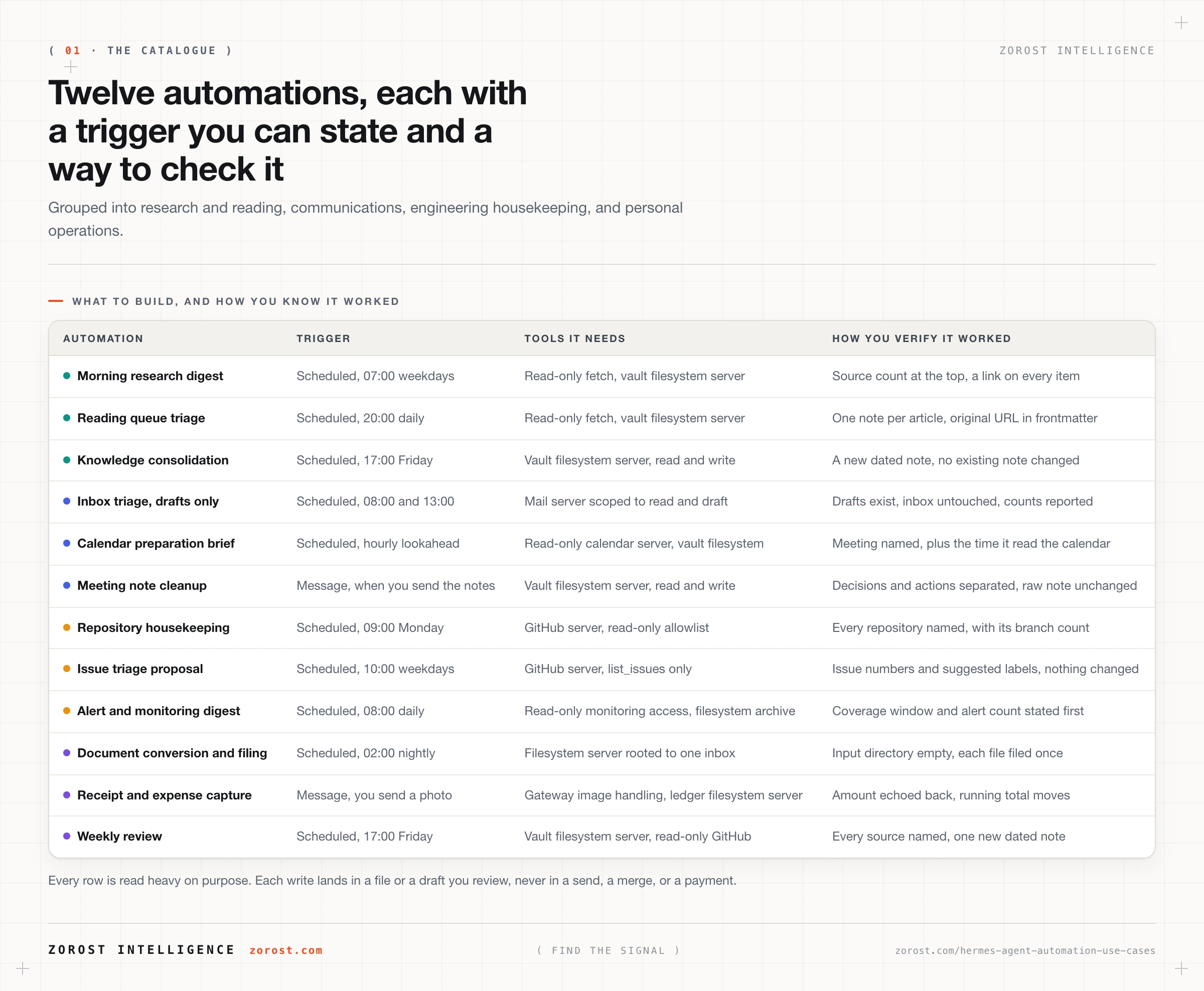
| Automation | Trigger | Tools it needs | How you verify it worked |
|---|---|---|---|
| Morning research digest | Scheduled, 0 7 1-5 |
A read-only fetch tool, or Chrome DevTools MCP for pages needing a browser, plus a vault filesystem server | Every item carries a source link and a date, with the source count at the top |
| Reading-queue triage | Scheduled, 0 20 * |
A read-only fetch tool, vault filesystem server | Each article becomes one note with the original URL in frontmatter, and the queue shrinks |
| Knowledge consolidation pass | Scheduled, 0 17 5 |
Filesystem server rooted to the vault, read and write | A new dated note lists the notes it read, and no existing note changed |
The failure modes to watch:
- Morning research digest. A fetch fails and the digest gets shorter rather than saying so. Require the source count, so a broken fetch shows up as a smaller number.
- Reading-queue triage. Summaries drift into paraphrase with no link back, useless in six months. Require the URL in frontmatter.
- Knowledge consolidation pass. The pass edits the notes it read instead of writing a new one. Require a dated file, and read the vault’s git diff.
All three write into a notes vault, where the value compounds, since a digest you can search a year later beats one you read once. Building a second brain with Hermes Agent and Obsidian covers the conventions they depend on.
Which communication automations are safe to run?
The ones that classify, draft, and brief. None of the ones that send.
| Automation | Trigger | Tools it needs | How you verify it worked |
|---|---|---|---|
| Inbox triage, drafts only | Scheduled, 0 8,13 1-5 |
A mail server scoped to read and draft, with no send in the allowlist | Drafts are in the drafts folder, the inbox is untouched, and the summary counts what it classified |
| Calendar preparation brief | Scheduled, 0 * 1-5, looking ninety minutes ahead |
A read-only calendar server, vault filesystem server | The brief names the meeting, the attendees, and the time it read the calendar |
| Meeting-note cleanup | Message, when you send the raw notes | Vault filesystem server, read and write | Decisions and actions come back separated, each action naming an owner or none |
The failure modes to watch:
- Inbox triage. The classification is confident and wrong on the one message that mattered. Keep the full list of what it saw and how it graded each item, so you can scan the downgrades.
- Calendar preparation brief. It briefs you on a cancelled meeting, or misses one added this morning. Have it state the time it read the calendar.
- Meeting-note cleanup. It assigns an owner nobody in the room accepted. Instruct it to leave unassigned actions unassigned.
Nothing here sends, because the costs are asymmetric. A draft you dislike costs one delete, while a message you did not write, sent in your name, cannot be pulled back.
Which engineering housekeeping automations pay off?
The ones that report on state nobody looks at until it becomes a problem.
| Automation | Trigger | Tools it needs | How you verify it worked |
|---|---|---|---|
| Repository housekeeping report | Scheduled, 0 9 1 |
GitHub MCP server, read-only allowlist such as list_issues and search_code, with GITHUB_PERSONAL_ACCESS_TOKEN |
The report names every repository it checked, with the branch count for each |
| Issue triage proposal | Scheduled, 0 10 1-5 |
GitHub MCP server, list_issues only |
The output lists issue numbers with a suggested label each, and nothing in the tracker changed |
| Alert and monitoring digest | Scheduled, 0 8 * |
Read-only access to your monitoring system, plus a filesystem server for the archive | The digest states its coverage window and total alert count before grouping anything |
The failure modes to watch:
- Repository housekeeping report. It reports the repositories it can see, which may be fewer than the ones you have, because the token scope is narrower than the question. Require the repository list in the output.
- Issue triage proposal. Give it
create_issueand an enthusiastic run files duplicates. Keep the allowlist read-only until you have watched a month of proposals. - Alert and monitoring digest. It summarises a quiet night and a dead exporter identically, since both produce no alerts. Require the count and the window, so zero out of zero looks wrong.
Issue triage shows where the line sits. Proposing labels needs list_issues, while applying them needs a write tool, which turns a proposal you skim into changes you must audit. Run the read-only version for a month, and if you accept every proposal unchanged, that is your evidence that promoting it is safe.
Which personal operations automations hold up?
The three that turn a pile into a dated artefact.
| Automation | Trigger | Tools it needs | How you verify it worked |
|---|---|---|---|
| Document conversion and filing | Scheduled, 0 2 * |
Filesystem MCP server rooted to one inbox directory | The input directory is empty afterwards and each document appears once in its destination |
| Receipt and expense capture | Message, you photograph the receipt | Gateway image handling, filesystem server rooted to the ledger | Each entry has a date, amount, vendor, and image link, and the total moves by that amount |
| Weekly review | Scheduled, 0 17 5 |
Vault filesystem server, read-only GitHub server if code is part of your week | The review names every source it assembled from and writes one new dated note |
The failure modes to watch:
- Document conversion and filing. It reprocesses the same documents nightly because nothing moves them out. Move files on success and check the input directory in the morning.
- Receipt and expense capture. A transcribed amount is wrong by a decimal place and nobody catches it until the quarter closes. Have it echo the amount and vendor back.
- Weekly review. It becomes a wall of text you stop reading by week four. Cap it at five decisions, five open items, and what changed.
Receipt capture uses what the gateway already does with images. Photograph, send, glance at the echo. That echo is the whole verification design, and it costs two seconds at the one moment when you still remember what the receipt said.
What does a durable automation look like from the inside?
It has six parts, and every abandoned automation is missing at least one.
- A precise trigger. A cron expression, an inbound message, or a file appearing in a watched directory.
- A bounded input. The ten most recent, the last seven days, or this one directory.
- The narrowest tool set that finishes the job. Across this catalogue that mostly means read tools only.
- A verification step. Re-read the result through a different path than the one that produced it.
- A report with counts. What it did, not only what it concluded.
- A delivery target you read. One chat, set with
/sethome.
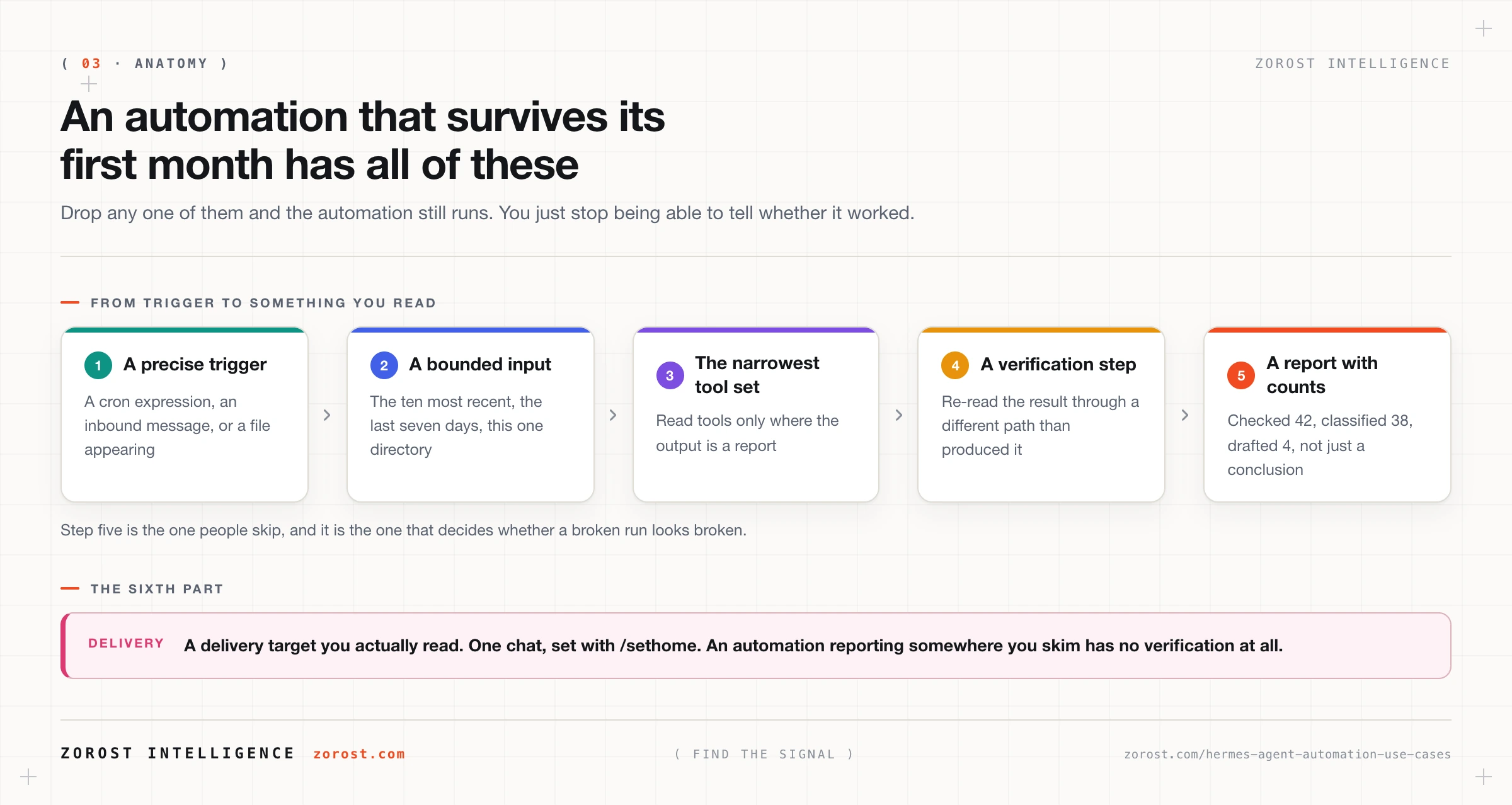
The report with counts is the part people skip, and the one that decides survival. “Checked 42 messages, classified 38, drafted 4” fails loudly the morning the mail credential expires, because zero of zero is obviously wrong. “Your inbox is under control” fails silently and reads like good news. That is the hallucinated-success class in the failure taxonomy for production agents, and unattended work is where it does most damage, because the report is the only artefact anyone sees.
Which automation should you build first?
The one with the highest frequency and the lowest blast radius, where you can check the output in under a minute.
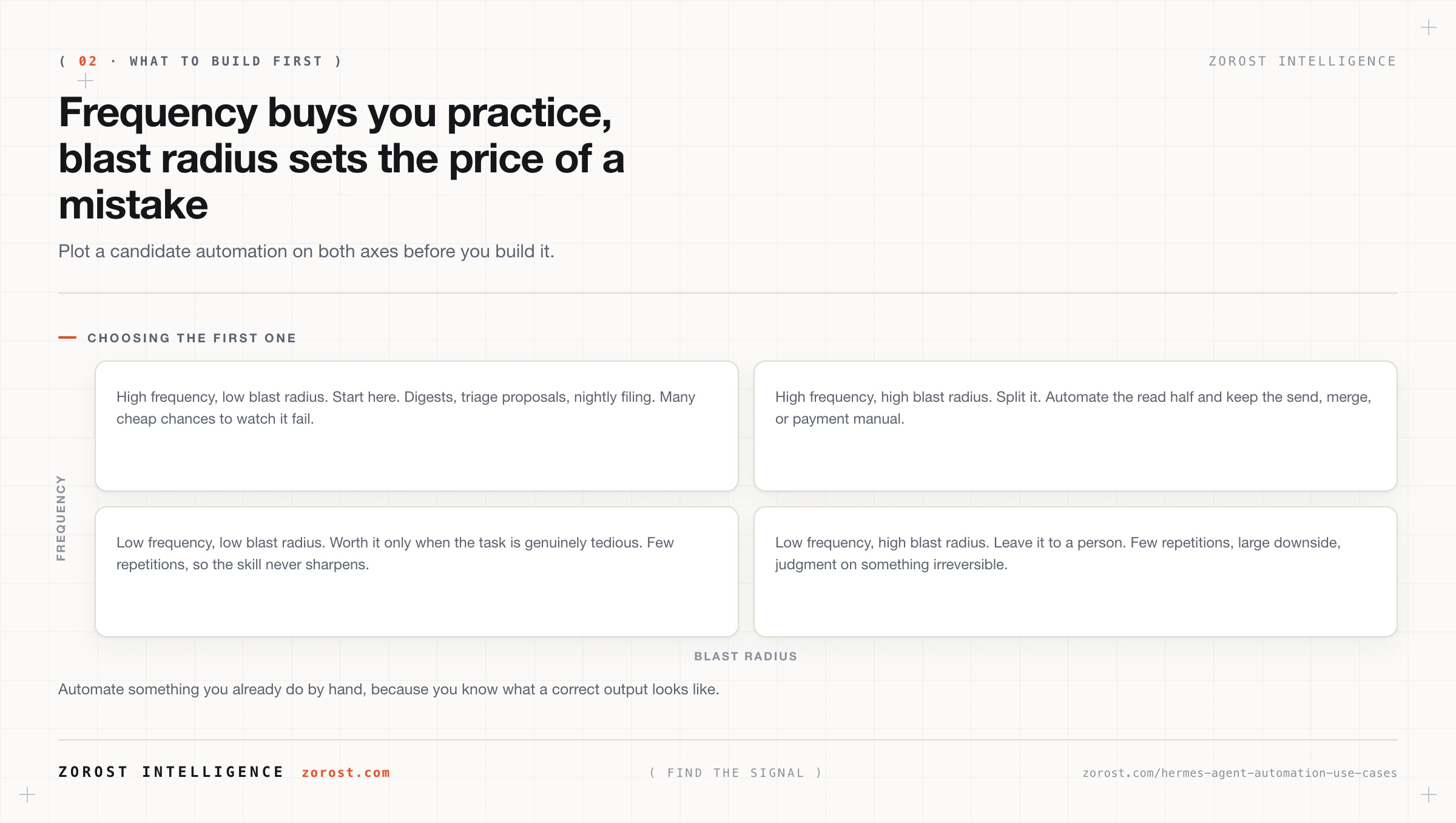
High frequency with low blast radius is where to start, because you get many cheap chances to watch it fail, and by the tenth run you know its habits. Low frequency with high blast radius is the worst place to begin, since few repetitions never build the confidence the risk would require. High frequency with high blast radius is where you split the work, automating the read half and keeping the write half manual, which is inbox triage that drafts without sending.
Two filters sit on the quadrant. Automate something you already do by hand, because you know what a correct output looks like. And stop at three for the first month, since the cost of a broken automation is the weeks you spent believing its output.
What should stay human?
Anything requiring judgment on an irreversible action, permanently, not until the models improve.
The list is short: sending a message on your behalf, merging a branch, paying an invoice, deleting anything, and telling a person something they will remember. In each case the agent does everything up to the decision. It drafts the message, prepares the merge summary, reconciles the invoice against the purchase order, and assembles the facts for the conversation. Then it stops, and you spend ten seconds on the part carrying the consequence. An automation designed to preserve that step is more useful over a year than one designed to remove it, because you keep running it.
Where this goes wrong
| Symptom | Likely cause | Fix |
|---|---|---|
| You stopped reading the digest | It reports conclusions without counts, so checking costs as much as doing the work | Require the source count and item list in every output |
| Nothing has fired since Tuesday | The gateway is not running, since the scheduler lives inside it | Check ~/.hermes/logs/gateway.log, then install as a service with hermes gateway install --system |
| The same work happens every night | The job is not idempotent, so a second run repeats the first | Move processed inputs, write dated files, check for today’s output first |
| The bill jumped this month | A frequent job fires whether or not there is anything to do | Match frequency to the source, and route to a cheaper model |
| It did something you cannot undo | A write tool was in scope when a read tool would have finished | Narrow tools.include and keep the irreversible step manual |
| The output is confidently wrong | No verification step, so the model’s claim is the only evidence | Have the run re-read the result and quote the evidence |
Common questions
How many automations should I run at once?
Start with two and add one at a time, waiting until each is boring before adding the next. Every automation is another thing that can break without announcing it, and the real cost is the weeks you spent trusting its output.
Do all of these need the gateway running?
Every scheduled one does, because the Hermes scheduler lives inside the gateway process and ticks every 60 seconds. Message-triggered automations need it too, since the gateway connects your chat platform. Install it as a service with hermes gateway install --system so a reboot does not quietly end your morning digest.
Which MCP servers do I actually need?
Fewer than the catalogue suggests. A filesystem server rooted to one directory covers most of the research, reading, and personal operations entries, and a GitHub server with a read-only allowlist covers the engineering ones. Add a server when an automation you already run by hand needs it.
Can I run these against a cheap model?
Most of them, yes. Summarising, classifying, and filing do not need your most capable model, and unattended work is the obvious place to route down the ladder, which running Hermes Agent cheaply works through. Keep the expensive model for sessions where you are watching.
What if an automation makes a mistake I never notice?
Design for that outcome rather than against it. Keep the automation’s writes in version control or in dated files so a mistake is a revertable diff, keep irreversible actions manual, and require counts so a broken read is visibly broken rather than quietly empty.
Next steps
- Pick two from the catalogue, both high frequency and low blast radius, and run them for a fortnight before adding a third.
- Run each by hand twice before scheduling it. If the second run changes something the first already did, fix the idempotency first.
- Add the verification line to every automation you already have, so each output states what it checked and how many it found.
- Next in this series, wiring Hermes Agent into the rest of your stack covers choosing between an MCP server, a native tool, and a scheduled script when nothing here fits.
- For the reasoning behind the verification step, the failure taxonomy for production agents names hallucinated success and the classes that get expensive once nobody is watching.
Alert digests that state their coverage window before their findings are the same discipline we run behind SPCio in manufacturing quality, where an operator paged for everything eventually stops reading pages.