
Hermes Agent explained, an AI agent that runs on your own machine
Pull-quote: “Hermes Agent is free software. Your only running cost is the inference you choose, and a local model costs nothing per token.”
Hermes Agent is an open-source, MIT-licensed agent harness from Nous Research that runs on your own machine, keeps its memory in files you own, and acts through tools you give it. Nous Research released it as open source in February 2026, the repository is at github.com/NousResearch/hermes-agent, and the tagline is “the agent that grows with you”.
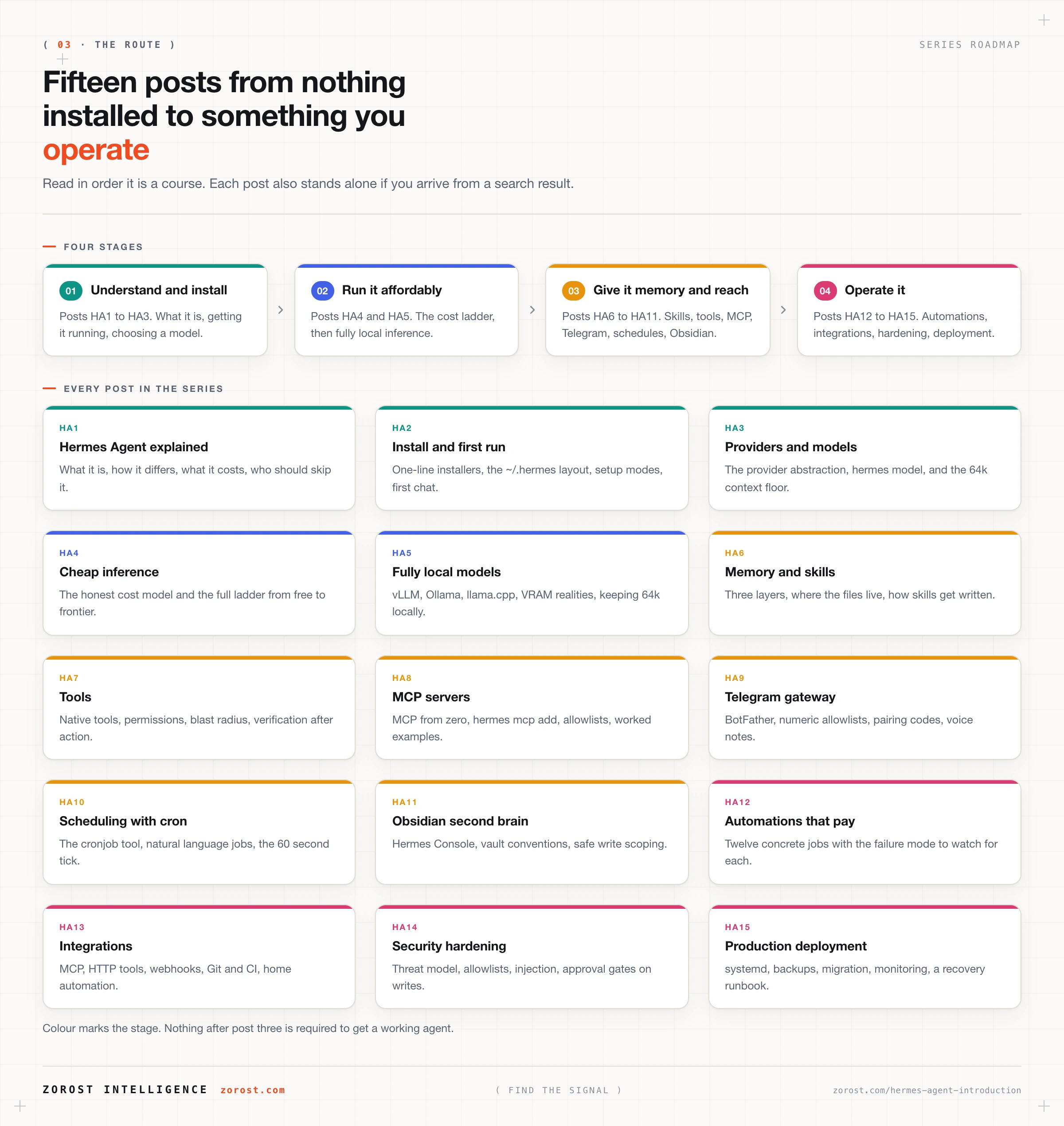
This post is the front door to a fifteen-post series that ends with a Hermes Agent you installed, configured, secured, and left running. It assumes you are technically literate and have never self-hosted an agent, so terms get defined the first time they appear, including harness, context window, and MCP.
You will not install anything here. That is the next post.
What you will be able to do
- Define Hermes Agent in one sentence, and explain why it is not the Hermes language models that share its name.
- Name the five parts of the system and say what each one is responsible for.
- Explain where a chatbot stops and an agent starts, in terms of memory, tools, and presence.
- Estimate what running Hermes Agent will cost you, and identify which parts are free.
- Judge whether it fits your situation, or whether a simpler tool is the honest answer.
- Follow the rest of the series in order, knowing what each post adds.
What is Hermes Agent?
Hermes Agent is an open-source, self-hosted AI agent harness built by Nous Research and released under the MIT licence in February 2026. It installs on Linux, macOS, WSL2, or native Windows, stores everything it knows in files under one directory on your disk, and calls whichever language model you configure.
A harness is the program that surrounds a language model and turns it into something that can do work. The model supplies judgment on each turn. The harness decides what the model sees, what it may do with its answer, and what is worth keeping afterwards. Two people running the same model through different harnesses get very different results, because most of the engineering lives in the harness.
Self-hosted means the program runs on hardware you control. There is no account to create with Nous Research, no telemetry, and no usage analytics. Network calls go only to the providers you configure. Documentation lives at hermes-agent.nousresearch.com and the project site is hermes-agent.org.
Is Hermes Agent the same thing as the Hermes models from Nous Research?
No. Hermes Agent is a harness, and the Hermes models are language models. Nous Research publishes both, which is why the two get conflated constantly in search results and in conversation.
The harness is model-agnostic. It runs any supported model, including models from vendors with no relationship to Nous Research. Nothing in Hermes Agent assumes a Hermes model is answering, and nothing about the harness changes when you switch models.
So benchmark scores for a Hermes language model tell you nothing about whether Hermes Agent will finish a task on your machine. Benchmarks measure judgment on isolated problems. Whether an agent finishes real work depends on the loop, the memory, the tools it can reach, and whether the process is still alive an hour later.
How is Hermes Agent different from a chatbot or a coding assistant?
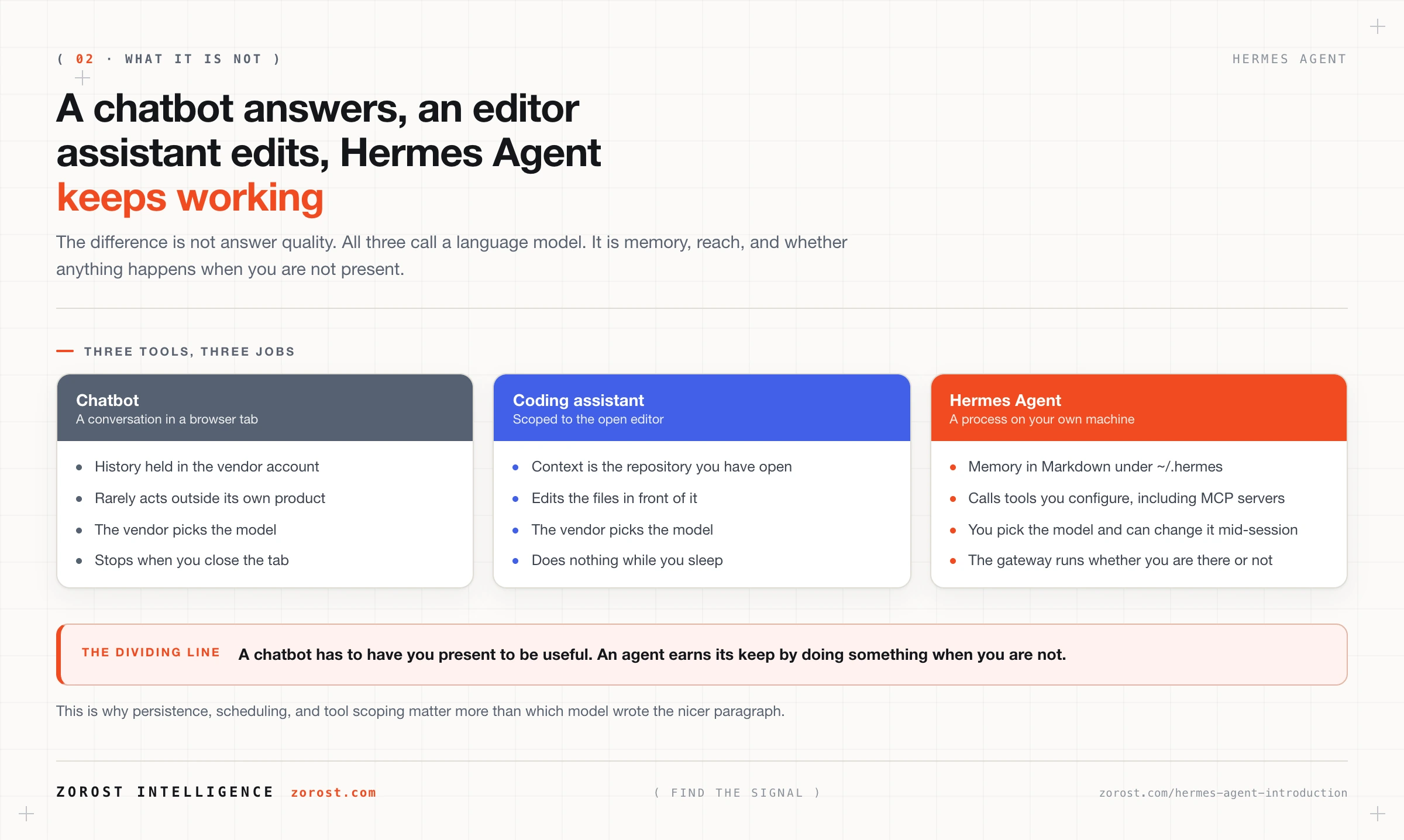
A chatbot answers and forgets, a coding assistant edits the files in front of it, and Hermes Agent keeps memory, calls tools you configure, and continues running when you are not there. All three call a language model. The difference is everything around the call.
Against a chatbot, four things change. Memory persists in Markdown files on your own disk instead of a history held in a vendor account. A tool layer lets it act on systems rather than describe what you should do. It works on your behalf while you are asleep. And it runs as a background process rather than existing only while a browser tab is open.
Against a coding assistant, the difference is scope and location. A coding assistant is tethered to your editor and its context is the repository you have open. Hermes Agent is a general-purpose process you reach from a terminal or a messaging app, it holds memory across projects and across days, and its tools need have nothing to do with code.
| Capability | Chatbot | Coding assistant | Hermes Agent |
|---|---|---|---|
| Memory between sessions | Held in the vendor account | Repository context in the editor | Markdown files under ~/.hermes/ |
| Can take actions | Rarely, inside the vendor product | Edits files in the open project | Calls tools you configure, including MCP servers |
| Where it runs | The vendor’s servers | Inside your editor | Your machine or your own server |
| Works while you are away | No | No | Yes, through the gateway and its scheduler |
| Who picks the model | The vendor | The vendor | You, from more than 30 providers |
What are the parts of Hermes Agent, and what does each one do?
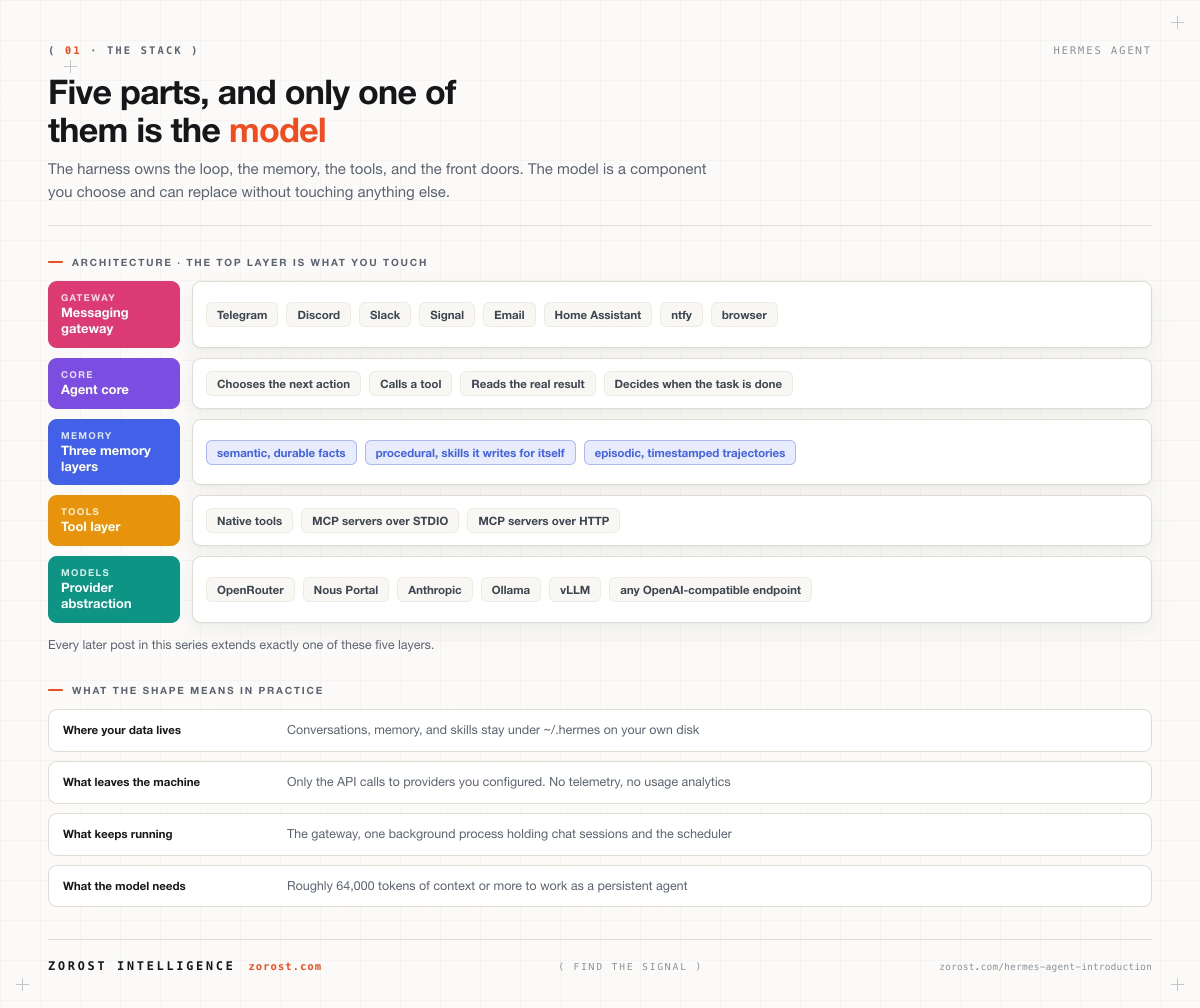
Hermes Agent has five parts: an agent core that runs the loop, a three-layer memory, a tool layer, a messaging gateway, and a provider abstraction that talks to models. Learning these names makes the rest of the series readable, because every later post extends one of them.
The agent core
The agent core is the loop that turns a request into finished work. Instead of producing one answer and stopping, it decides on a next action, takes it, reads what came back, and decides again, until the task is done or it runs out of room.
Room is literal. Everything the model considers on a turn must fit inside its context window, the fixed amount of text a model holds at once, measured in tokens. A token is roughly three quarters of a word. Hermes Agent needs about 64,000 tokens or more, because system instructions, tool definitions, retrieved memory, and the conversation so far all occupy that window before the model reads your message.
The three-layer memory
Hermes Agent splits memory into semantic, procedural, and episodic layers, because those three kinds of knowledge have different lifespans.
Semantic memory holds durable facts about you and your projects as local Markdown such as memory.md, retrieved by relevance rather than loaded wholesale. Procedural memory holds skills, step-by-step task instructions stored as Markdown under ~/.hermes/. Hermes writes a skill automatically when it notices a repeated workflow, then refines it, which is the mechanism behind the tagline. Episodic memory holds time-stamped conversation and run trajectories, a trajectory being the full record of one run. It compresses in a session with /compress and exports for evaluation or training.
The tool layer, including MCP
The tool layer is what lets the agent act rather than describe, and MCP is the standard way to plug new tools in. MCP stands for Model Context Protocol, an open protocol for exposing a set of tools to an AI agent over a defined interface.
Hermes Agent is an MCP client, meaning it consumes tools rather than publishing them. MCP servers supply those tools over STDIO, where the server runs as a local process communicating over standard input and output, or over HTTP. You add servers with hermes mcp add, confirm one works with hermes mcp test <name>, and configure them under mcp_servers in ~/.hermes/config.yaml.
The messaging gateway
The messaging gateway is one background process, started with hermes gateway, that connects every platform you configured, keeps a separate session per chat, and runs the scheduler. It exists because a terminal session ends when you close the terminal, and work scheduled for three in the morning needs something still running.
Platform adapters cover Telegram, Discord, Slack, WhatsApp, Signal, Matrix, Microsoft Teams, Email, Home Assistant, ntfy, a browser, and more. The scheduler ticks every 60 seconds, runs any job that has come due, and delivers output to the target chat. Activity is written to ~/.hermes/logs/gateway.log.
The provider abstraction
The provider abstraction lets the same agent run on more than 30 model providers, plus any OpenAI-compatible endpoint, without changing anything else. API keys live in ~/.hermes/.env, and providers you sign into through a browser store refresh tokens in ~/.hermes/auth.json.
This is why local models are a first-class option rather than a special case. An engine such as Ollama, vLLM, llama.cpp, LM Studio, or SGLang serves an OpenAI-compatible endpoint on your own machine, and Hermes treats it like any hosted provider.
What does Hermes Agent actually cost to run?
The software is free and you pay only for the inference you choose. There is no subscription and no metering by Nous Research, because the MIT licence and the absence of telemetry leave nothing to meter.
| What you run | What you pay | What drives the amount |
|---|---|---|
| A hosted model, direct or through an aggregator | Per token, billed by that provider | How much context you send and how often the agent runs |
| A local model on your own hardware | Nothing per token | Hardware you own or buy, plus electricity |
| The machine the harness lives on | Whatever your server or desktop costs | Light, because inference happens at the provider |
One complication worth knowing early: agents send far more context per request than a person chatting does, because system instructions, tool definitions, and retrieved memory ride along on every turn. That makes model choice a cost decision, covered in the Hermes Agent cost ladder.
What do you need in order to run Hermes Agent?
You need a supported operating system, one configured model provider, and a model offering roughly 64,000 tokens of context or more. That is the whole list.
Supported platforms are Linux, macOS, WSL2, and native Windows. At least one LLM provider must be configured or the agent cannot run, and that provider may be a hosted API or a local engine. The context requirement is what people miss: a smaller model will start, then lose the thread partway through multi-step work. Hermes prints the detected limit when a chat session starts, in the form Context limit: 128000 tokens, so you can check it in the first second of use.
Hardware is undemanding with hosted inference, because the model runs on someone else’s GPU. Running a model locally changes that calculation completely. The install itself needs no administrator rights.
Who should use Hermes Agent, and who should not?
Use Hermes Agent if you want an agent whose memory, tools, and model choice belong to you. Skip it if you want something that works with no configuration and no maintenance, because a self-hosted agent is a small system you now operate.
It fits when you want conversation data on your own disk, when you want to change models without changing anything else, when you want work to happen while you are away, and when your use case spans tools no single vendor connects. Being comfortable editing a YAML file and reading a log helps, because you will do both.
It is a poor fit in four cases. If you need a support contract and a service level agreement, this is an open-source project and there is nobody to call. If your only use case is writing code in your editor, a coding assistant serves you better. If you are not prepared to think about what an agent may touch, write access without scoping is a liability. And if you cannot supply a model with roughly 64,000 tokens of context, the experience will disappoint you.
Where this goes wrong
You evaluate the model and conclude agents are not ready. The symptom is trying three models, getting slightly different answers, and giving up. The cause is treating the model as the system. An agent that answers well but never finishes multi-step work usually has no tools configured.
The agent forgets what it was doing halfway through a task. The cause is nearly always a model below the context floor. Read the Context limit: line printed when a chat session starts, and if the number is well under 64,000, switch models rather than prompting around it.
You install with sudo out of habit. The installer does not need administrator rights, and installing that way creates permission problems later. If it has already happened, remove the hermes binary from /usr/local/bin and run the normal installer again.
Nothing runs overnight. A chat session in your terminal and the gateway are different processes. Scheduled work happens inside the gateway, so nothing runs while you are away unless the gateway is running.
You grant broad tool access on day one. An agent that can write anywhere will eventually write somewhere you did not intend. Start with the narrowest tool allowlist that does the job, root filesystem access to a single directory rather than your home folder, and read the Hermes Agent hardening post before widening anything.
Common questions
Is Hermes Agent free to use?
The harness is free and MIT licensed, so you can read the source, modify it, and use it commercially without paying anyone. What you pay for is inference: a hosted provider bills you per token, and a model you run locally has no per-token charge.
Where does Hermes Agent store my data?
Everything lives under ~/.hermes/ on your own disk. Configuration sits in config.yaml, secrets in .env, OAuth tokens in auth.json, and memory, skills, session logs, and cron definitions as files in that directory. There is no telemetry, so the only data leaving your machine is the content of API calls to providers you configured.
Do I need a GPU to run Hermes Agent?
Not for hosted models, because inference happens at the provider and the harness is light enough for a very small server. A GPU matters only when you run the model locally with an engine such as vLLM or Ollama.
Can I use a model I already pay for?
Yes. Hermes Agent supports more than 30 providers plus any OpenAI-compatible endpoint, so an existing account with OpenAI, Anthropic, Gemini, or OpenRouter works directly. You put the key in ~/.hermes/.env and select the model.
Does Hermes Agent work on Windows?
Yes, in two ways. It runs on native Windows through a PowerShell installer, and it runs under WSL2 with the installer used on Linux and macOS.
Next steps
Read installing Hermes Agent and surviving your first session next, because everything here becomes concrete once you can see the ~/.hermes/ directory on your own machine and read the context limit on startup.
For the reasoning behind why a harness matters more than a model, the harness, not the model, decides whether your agent works makes the same argument in the general case. The rest of the technical writing sits in the Signals index.
Zorost builds and operates agentic systems in production, where persistent memory, scoped tools, and a loop that closes decide whether an agent survives contact with real work. We publish what we test in the open in AI Fieldwork.