
Genie One, the data coworker your business team touches
Pull-quote: “A scheduled prompt is a recurring claim about your data. Give it an owner, or it becomes a fact nobody checks.”
Genie One is the Databricks product a business user actually touches, and the change worth understanding is that it works on a clock as well as on demand. It is the business-user AI coworker: one entry point to AI/BI Dashboards, natural-language chat, and Databricks Apps, governed by Unity Catalog. Both the product and chat inside it are generally available.
The naming shifted in mid-2026, which is why older material reads oddly. Genie on its own is now the top-level portal. Genie One is the business-user experience. Genie Agents, called Genie Spaces until July 2026, are the curated domain interfaces holding the datasets and instructions behind an answer.
This post is for the person deciding whether a finance, operations, or quality team gets access, and for the analyst who will support them afterwards. It assumes a Unity Catalog metastore and one curated dataset, and nothing about Genie. By the end you will know which capabilities to turn on first, where a read turns into a write, what the product cannot decide for you, and what it costs to leave running.
What you will be able to do
- Explain what Genie One is, how it differs from Genie and from Genie Agents, and which name belongs where.
- Choose between a scheduled task and an alert for a recurring information need, and justify the choice.
- Decide which Model Context Protocol connectors to enable first and which need an owner before anyone touches them.
- Place Genie One on the surface each team will actually use: browser, mobile, Microsoft Teams, or Slack.
- Draw the line between what Genie One decides and what your data model and your analysts decide.
- Put a budget and a review cadence in place before the first invoice rather than after it.
What is Genie One, and how does it differ from Genie?
Genie One is the business-user AI coworker in Databricks: a single entry point to AI/BI Dashboards, natural-language chat, and Databricks Apps, with access governed by Unity Catalog. Genie without a suffix is the portal those things live in. The names moved in mid-2026, so a document written six months ago uses “Genie” to mean the assistant.
| Older name | Current name | What it means now |
|---|---|---|
| Genie, the AI/BI assistant | Genie One | The business-user AI coworker |
| Databricks One, the simplified interface | Genie | The top-level portal |
| Genie Spaces | Genie Agents | Curated, domain-scoped interfaces over registered datasets |
The governance underneath did not change with the rename. A question becomes SQL, the SQL runs against curated datasets, and Unity Catalog decides which rows and columns the asking user may see. Answers you can defend covers why entitlement is enforced on the query rather than on the interface.
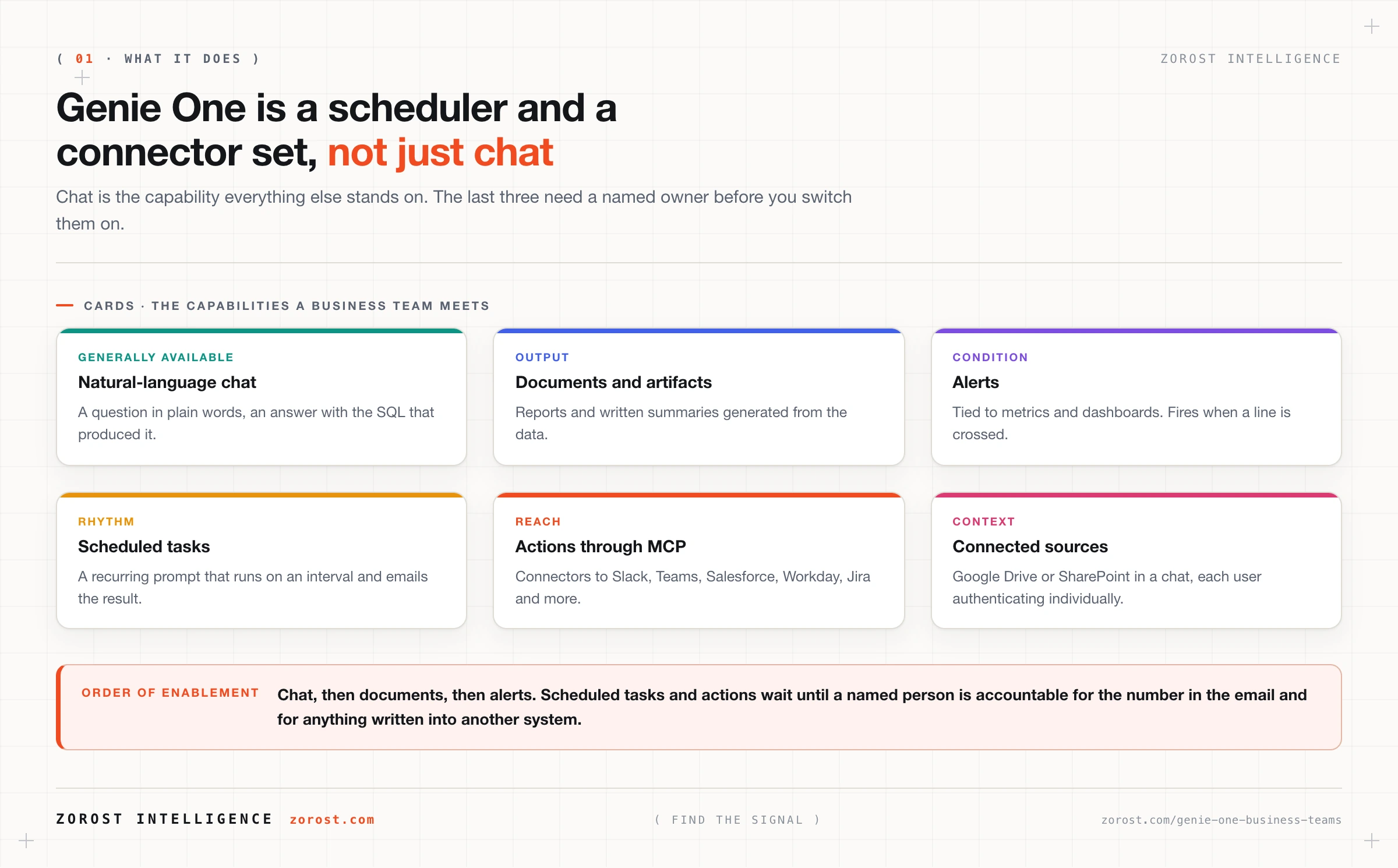
What did change is the shape of the product a business user meets. Genie One is a chat surface, a scheduler, an alerting path, a document generator, and a set of connectors into other applications.
What can a business team do with Genie One in the first week?
Ask questions in plain language and receive an answer with the query behind it. Chat is generally available, and every other capability builds on it. A user picks a Genie Agent for the domain they care about, types a question in their own words, and gets a result plus the SQL that produced it. That last part makes an answer arguable rather than magic, which is why a sceptical analyst makes a useful pilot user.
Four capabilities sit on top of chat, in rising order of consequence.
- Documents and artifacts. Reports and written summaries generated from data, so a monthly commentary starts from something rather than an empty page.
- Alerts. Tied to metrics and dashboards, so a threshold that matters produces a notification instead of a habit of checking.
- Scheduled tasks. A recurring prompt that runs on an interval and emails the result.
- Actions. Model Context Protocol connectors, so a conversation can reach other applications rather than ending at the answer.
Enable them in that order, and hold the last two until someone owns them.
How do scheduled tasks turn Genie One into a coworker?
A scheduled task is a recurring prompt that runs on an interval and emails the result, which is the feature that moves the product from a question box to something that arrives whether or not anyone asked today. A question you type is a question you are present for, so a strange answer gets a second look. A scheduled answer lands in an inbox where nobody is looking for the strangeness.
Treat a scheduled prompt the way you would treat a report definition, because that is what it is. Four rules keep the practice honest.
- Write the prompt as a specification. Name the metric, the grain, the comparison period, and the filter. “Weekly revenue by region for the last complete week, compared with the same week last year, excluding internal test accounts” is a prompt. “How did we do this week” is a hope.
- Run it by hand first. Ask the same question interactively for two or three cycles and read the SQL each time. You know it is working when the emailed figure matches what you get by asking by hand on the same day, through the same Genie Agent.
- Give it a named owner and a review date. Somebody has to be accountable for the number in the email, and somebody has to confirm it is still read. Unowned recurring email is how a wrong figure becomes an institutional belief.
- Keep the recipient list small. Wide distribution turns a draft into a source of truth in about two weeks.
When is an alert the right tool instead of a scheduled task?
Use an alert when you care about a condition and a scheduled task when you care about a rhythm. Alerts in Genie One are tied to metrics and dashboards: something crosses a line and a person hears about it. Scheduled tasks fire on the clock regardless of whether anything happened.
The distinction decides whether people keep paying attention. A daily task whose answer is “nothing changed” trains its recipients to skim, and a skimmed report will be skimmed on the day it matters. If you find yourself writing a scheduled prompt that ends with “and tell me if anything looks wrong”, you wanted an alert.
What do actions through MCP actually let Genie One do?
Actions run through Model Context Protocol connectors, which reach enterprise applications including Slack, Microsoft Teams, Salesforce, Workday, and Jira. Databricks cites more than 50 connected enterprise applications. A conversation can also have external sources attached, so Google Drive or SharePoint content can be brought into a chat, with each user authenticating individually, and custom MCP servers can be added as sources.
That scope brings two consequences a rollout plan has to address explicitly.
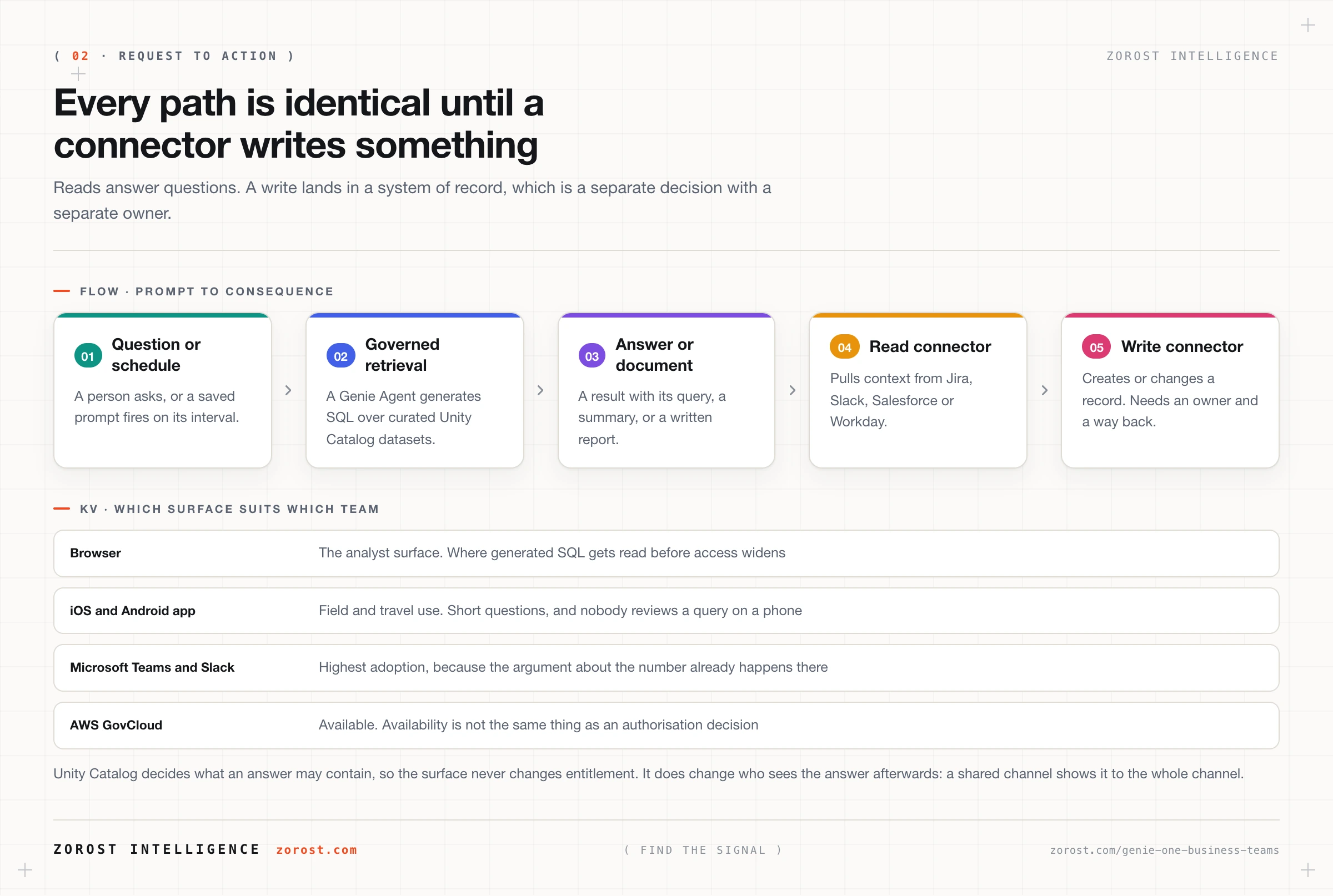
Reads and writes are different risk classes, so enable them at different times. A connector that fetches a Jira ticket is a retrieval feature. One that creates or transitions a ticket writes into a system of record, where a confidently wrong action leaves a trail somebody else has to unwind. Start with reads that answer questions people already ask by hand. Before enabling a write, decide who may use it and how a mistaken write is found and reversed.
Connected content is input, and input is not trustworthy because it sits on your own file share. A shared drive holds documents written outside your governance boundary, sometimes by an outside party who knew a model might read them. Text that instructs a model rather than informing it is the family of attacks called prompt injection, and the mitigations are the same here as anywhere: narrow the connector’s reach, prefer read-only, and never let retrieved text authorise an action. Prompt injection and LLM security covers the controls that hold.
Where does Genie One run: browser, mobile, Teams, or Slack?
All four. Genie One runs on the web, on iOS and Android through the Databricks Genie mobile app, and inside Microsoft Teams and Slack. It is also available on AWS GovCloud.
Surface choice is an adoption decision more than a technical one, and the answer is wherever the team already argues about numbers. A finance team that lives in Teams will use the Teams surface and ignore a bookmark. What the surface never changes is entitlement, because Unity Catalog decides what data an answer can contain. What it does change is who sees the answer afterwards: a reply in a shared channel is visible to everyone in that channel, including people who could not have asked the question themselves. That is a channel membership decision rather than a permissions bug, and it belongs in your rollout guidance.
What can Genie One not decide for you?
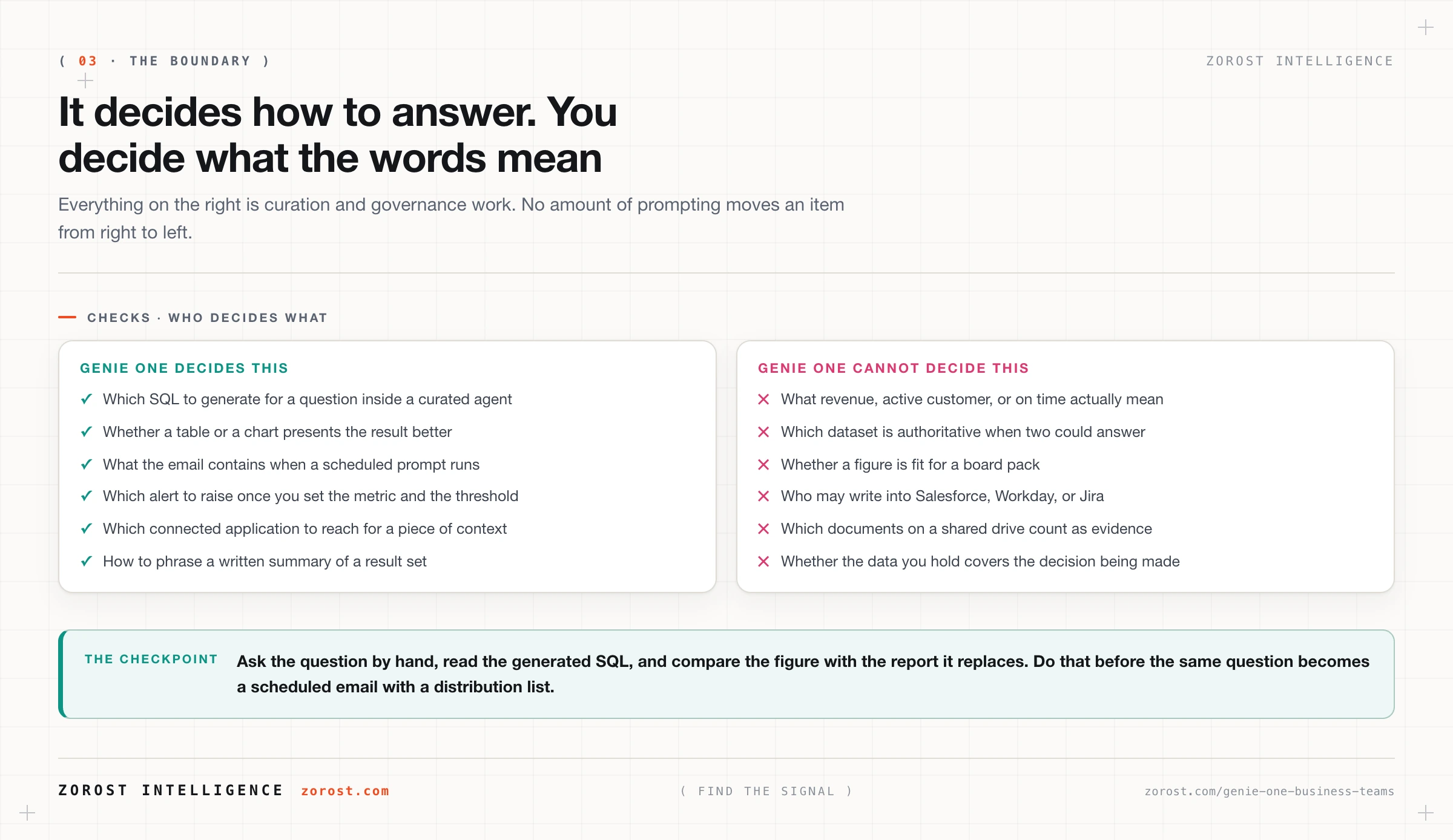
It cannot decide what your business terms mean, which dataset is authoritative, or whether a number is fit to put in front of a board. Those are curation and governance decisions that live outside the chat surface.
Three limits belong in a rollout memo. Genie One does not resolve competing definitions: if revenue is defined three ways across your Gold layer, you get three defensible answers depending on which agent the question lands in. It does not decide scope, because what an agent covers is chosen dataset by dataset by the analyst who curates it. And it does not judge sufficiency, since an answer can be correct on the data available and still be the wrong basis for a decision.
The work that removes those limits is curation, and it belongs to analysts. The layer meant to ground meaning across every agent is described in Genie Ontology, the context layer, and it is in preview rather than generally available.
What does Genie One cost to leave running?
Genie products moved to pay-as-you-go billing on 6 July 2026 on AWS and 8 July 2026 on Azure, with a free monthly allowance of 150 DBUs of LLM usage, roughly $10.50 in US East. Beyond the allowance, usage is billed in DBUs reflecting the models and agents powering each session, and account administrators can set budgets and cost controls.
Set the budget before the pilot rather than after the first invoice. An agentic tool with a per-token cost and no budget is a support ticket waiting to happen, and the line item that surprises people is the scheduled task, because it consumes on its interval whether or not anyone opens the email. Ten unread daily tasks are a recurring charge with no reader.
Where this goes wrong
Scheduled tasks with no owner. The symptom is a recurring email whose number nobody can explain, still arriving months after its creator changed roles. The cause is treating a scheduled prompt as a convenience rather than as a report definition. Require a named owner and a review date, and delete the tasks that fail review.
Write connectors enabled alongside the reads. The symptom is a record created or changed in a system of record by an action nobody authorised. The cause is enabling a connector set as a bundle because it arrived as one. Split the decision: reads first, writes only with an owner and a documented way to reverse a mistake.
A shared drive treated as trusted context. The symptom is an answer that confidently repeats something no governed dataset says. The cause is connected document content being read as fact when it is only text. Scope connected sources tightly and keep them out of conversations that drive actions.
Chat mistaken for a governance boundary. The symptom is a review that finds a sensitive column reachable through an agent and concludes the product leaked data. The cause is confusing curation with entitlement. Unity Catalog grants, row filters, and column masks decide what any user sees, and adding a dataset to an agent is a curation act rather than a grant.
Rolled out to everyone at once. The symptom is a wrong answer in front of an executive in week two, after which no amount of fixing recovers the project. The cause is skipping the pilot group where analysts still read the SQL behind every answer.
Common questions
Is Genie One the same thing as Genie?
No. Genie One is the business-user product: chat, dashboards, and apps in one place, generally available. Genie on its own now names the top-level portal that contains those experiences. Until mid-2026 “Genie” meant the assistant, which is why older documents use the word differently.
Do users need to know SQL to use Genie One?
No, but somebody in the loop should. Users ask in plain language and receive an answer with the SQL that produced it. Reading that SQL is how a pilot group tells a correct answer from a plausible one, so put at least one person who can read a query into every early rollout.
Can Genie One answer questions about a PDF or a contract?
Not through a Genie Agent, which works over structured data only: the documentation is explicit that a Genie Agent cannot answer questions about PDFs, Word documents, or other file content. Separately, a Genie One conversation can have Google Drive or SharePoint connected as external sources, with each user authenticating individually. Those are two mechanisms with different guarantees, so do not promise document question answering as an analytics feature.
Can I run Genie One in a regulated environment?
Genie One is available on AWS GovCloud, which is an availability statement rather than a compliance conclusion. Your authorisation boundary, data classification, and choice of connectors still decide whether a workload is permitted, and connected external sources need the most scrutiny.
Who should own Genie One inside the business?
Two owners, not one. An analytics owner is accountable for the Genie Agents behind the answers, including datasets, instructions, and the benchmark questions. A business owner is accountable for the scheduled tasks, the recipient lists, and the alert thresholds. Rollouts stall when both roles are assumed to sit with the platform team.
Next steps
Pick one team and one recurring information need they already meet by hand. Turn on chat for that team against a single curated agent, ask their five most common questions yourself, and read the generated SQL for each one. Only then create a scheduled task, with a named owner and a review date, and only for the report someone currently assembles manually.
The next post in this series covers the analyst-side work that makes any of this trustworthy: curating a Genie Agent that earns trust sets out the four inputs, the 100-instruction ceiling, and why structured data only is a design constraint rather than a shortcoming. If your rollout has to survive a finance review, what Genie costs and how to roll it out covers the billing change and a sequencing plan.
Zorost builds these rollouts on client lakehouses as a trusted Databricks partner, where a scheduled task does not reach a distribution list until its number has been reconciled against the report it replaces.